Raspberry Pi Accessories: Essentials, Compatibility, and Setup Choices
Raspberry Pi accessories are hardware components that power, protect, connect, cool, expand, or otherwise enable a Raspberry Pi board to operate for a specific purpose. Their suitability is determined by the Raspberry Pi model, available interfaces, electrical requirements, storage method, and intended application rather than by a universal list of required products. According to Raspberry Pi Documentation, Raspberry Pi 4, Raspberry Pi 5, Raspberry Pi 400, and Raspberry Pi 500 use micro-HDMI display outputs, while Raspberry Pi Zero and Raspberry Pi Zero 2 W use mini-HDMI outputs, making board-specific compatibility a primary selection criterion.
Accessory selection should begin with setup requirements instead of product preference because each accessory performs a defined function within the complete system.
Accessory selection should begin with setup requirements instead of product preference because each accessory performs a defined function within the complete system. According to Raspberry Pi Documentation, every functional Raspberry Pi setup requires compatible power delivery, boot storage, and an appropriate display or remote-access method, while accessories such as cooling solutions, cases, GPIO expansion boards, cameras, or HATs become necessary only when the intended workload or project requires those capabilities.
Although both boards support HDMI video output, selecting the wrong connector prevents direct display connection despite the boards performing the same basic function.
For example, according to Raspberry Pi Documentation, a Raspberry Pi 5 connected to a conventional monitor requires a micro-HDMI-to-HDMI cable, whereas a Raspberry Pi Zero 2 W requires a mini-HDMI-to-HDMI cable. Although both boards support HDMI video output, selecting the wrong connector prevents direct display connection despite the boards performing the same basic function.
For example, according to Raspberry Pi Documentation, a Raspberry Pi 5 connected to a conventional monitor requires a micro-HDMI-to-HDMI cable, whereas a Raspberry Pi Zero 2 W requires a mini-HDMI-to-HDMI cable.
Viewing Raspberry Pi accessories as compatibility-driven components rather than standalone products provides a clearer basis for evaluating accessory categories, understanding board requirements, and making practical setup decisions without purchasing unnecessary hardware.
Table of Contents
Understanding Raspberry Pi Accessories and What They Add to a Setup
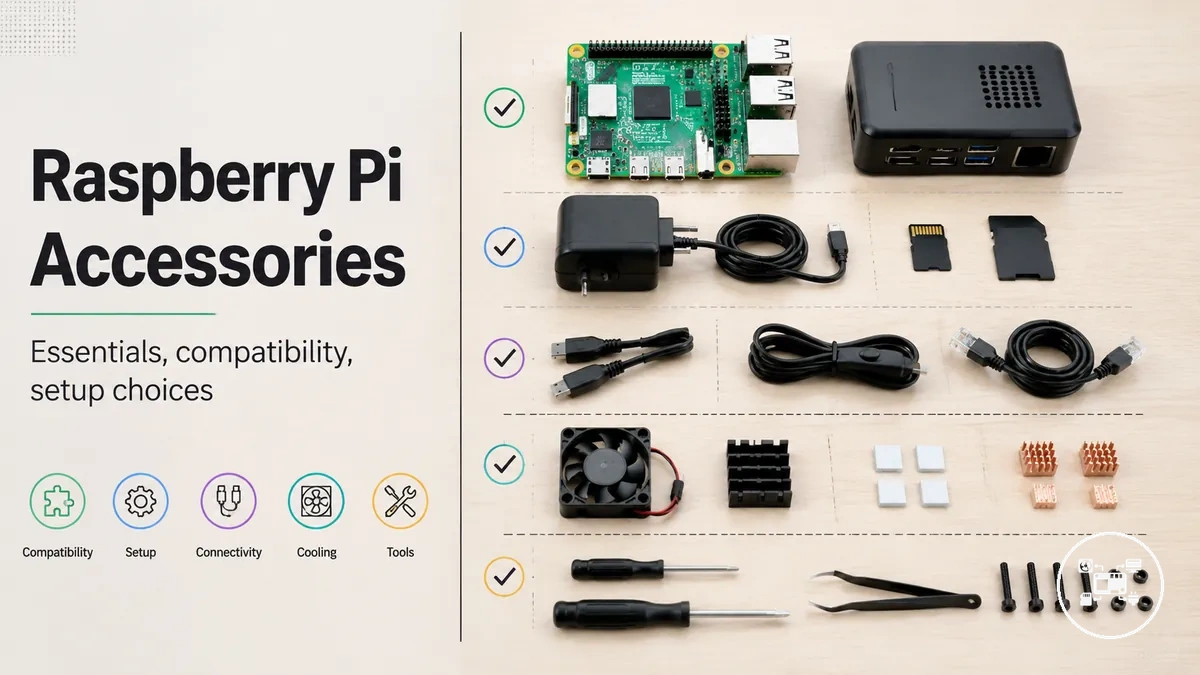
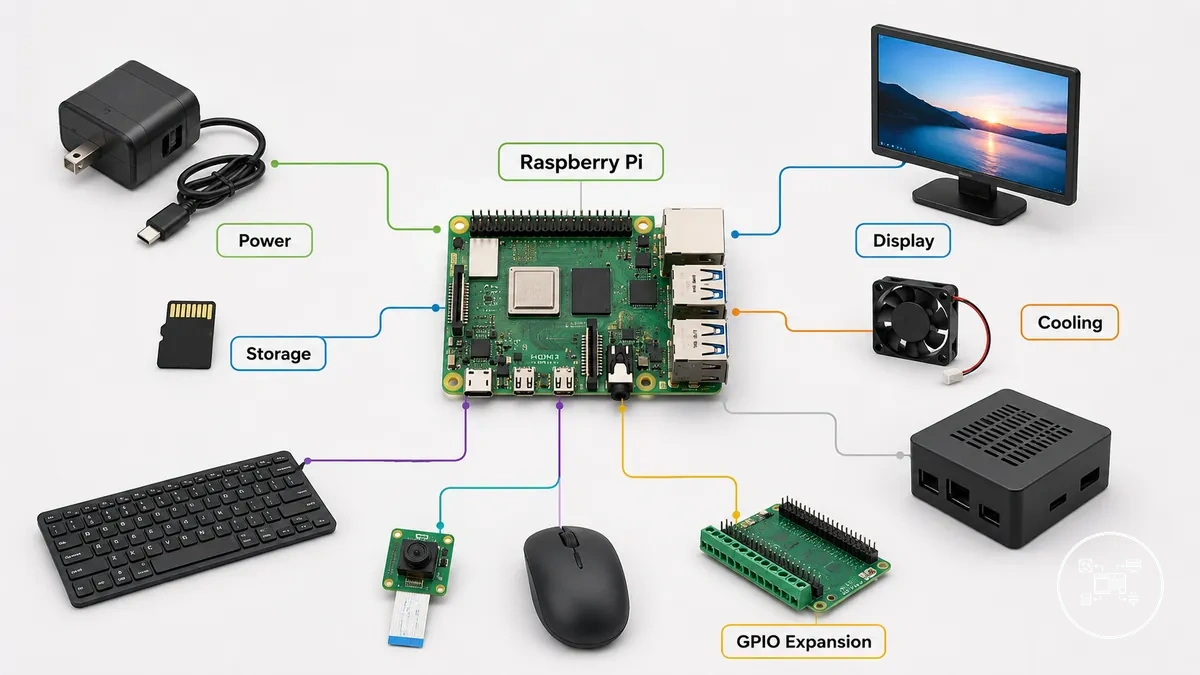
Raspberry Pi accessories are external hardware components that provide power, connectivity, protection, storage, input, output, cooling, or expansion functions for a Raspberry Pi board. They are separate from the Raspberry Pi itself and extend or support the board's capabilities without replacing its processor, memory, or core hardware. According to Raspberry Pi Documentation, accessories include components such as official power supplies, microSD cards, displays, keyboards, mice, cameras, HATs, and other peripherals designed to connect through supported interfaces.
They are separate from the Raspberry Pi itself and extend or support the board's capabilities without replacing its processor, memory, or core hardware.
Accessories contribute different functions depending on the requirements of a Raspberry Pi setup and the interfaces available on the selected board model. For example, Raspberry Pi Documentation specifies that most full-size Raspberry Pi models expose a 40-pin GPIO header for compatible HATs and expansion boards, while Raspberry Pi Zero models also provide a 40-pin GPIO interface but often require header pins to be soldered before compatible accessories can be attached. These hardware boundaries mean that accessories extend a Raspberry Pi setup only when the board provides the required connector, interface, or electrical support.
Essential Raspberry Pi Accessories for Different Setup Requirements
Essential Raspberry Pi accessories are determined by setup requirements rather than by a universal shopping list. According to Raspberry Pi Documentation, every Raspberry Pi requires compatible power and boot storage, while accessories such as cooling, cases, cameras, displays, or GPIO expansion hardware are only essential when the intended workload or project depends on those functions.
The checklist below organizes accessories by setup criteria to simplify selection decisions.
The checklist below organizes accessories by setup criteria to simplify selection decisions. For a more detailed decision framework, see the essential Raspberry Pi accessories checklist.
- Power supply — Key attribute: Stable power delivery. Suitable when: Every Raspberry Pi installation requires a model-compatible power supply. Setup benefit: Supports reliable booting and stable operation.
- Boot storage — Key attribute: Operating system storage. Suitable when: Every Raspberry Pi requires boot media such as a microSD card or supported external storage. Setup benefit: Enables the operating system and user data to be stored.
- Cooling — Key attribute: Heat dissipation through a heatsink or fan. Suitable when: Sustained processing, enclosed cases, or continuous workloads increase processor temperature. Setup benefit: Helps reduce thermal throttling during prolonged operation.
- Display, keyboard, and mouse — Key attribute: Local user interaction. Suitable when: Desktop use or initial operating system configuration is performed directly on the Raspberry Pi. Setup benefit: Simplifies installation and local management.
- Protective case — Key attribute: Physical enclosure. Suitable when: The board is permanently installed, transported, or exposed to dust and accidental contact. Setup benefit: Improves physical protection without changing computing capability.
- GPIO expansion accessories — Key attribute: Hardware expansion through the GPIO header. Suitable when: Electronics, robotics, automation, or sensor projects require additional interfaces. Setup benefit: Extends project functionality while using the existing Raspberry Pi board.
Accessory priorities change with the intended application rather than remaining identical across all projects. For example, a headless server commonly requires only compatible power, boot storage, and networking, whereas a robotics build additionally benefits from GPIO expansion hardware and cooling. According to Raspberry Pi Documentation, selecting accessories according to the Raspberry Pi model, supported interfaces, and workload avoids unnecessary hardware purchases.
Accessory priorities change with the intended application rather than remaining identical across all projects.
The checklist above provides a practical starting point before choosing individual products or accessories for a specific Raspberry Pi model.
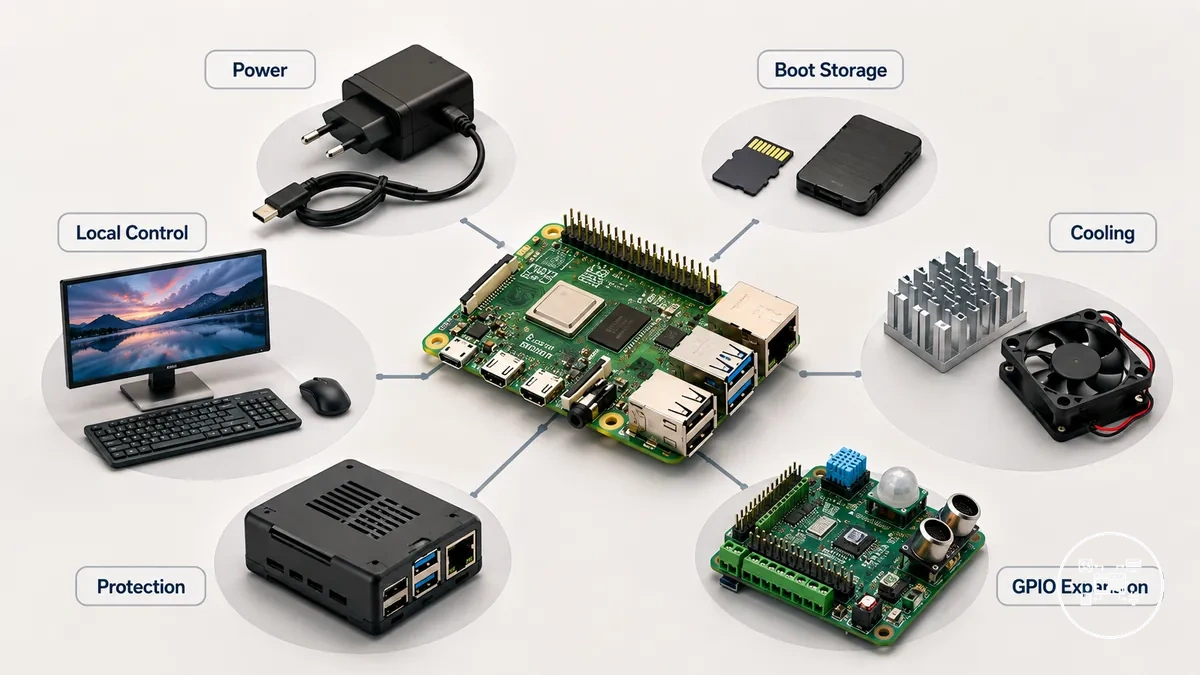
Raspberry Pi Accessory Types and Their Main Functions
Raspberry Pi accessory types are classified by the function they provide within a Raspberry Pi system rather than by the board model they accompany. According to Raspberry Pi Documentation, the main categories include power, storage, display and cable connectivity, cooling, protection, input devices, and hardware expansion, with each category supporting a different operational requirement instead of offering the same benefit across every setup.
The comparison below groups the major accessory types by function, usage condition, and practical outcome to clarify where each category fits.
The comparison below groups the major accessory types by function, usage condition, and practical outcome to clarify where each category fits. For example, a desktop workstation commonly requires Raspberry Pi display and cable accessories, while a continuously running media server or edge device can benefit from Raspberry Pi cooling accessories. Every Raspberry Pi installation also requires compatible Raspberry Pi power accessories, because Raspberry Pi Documentation specifies that the board must receive an appropriate power supply before it can boot.
| Accessory type | Main function | Typical condition | Setup impact |
|---|---|---|---|
| Power accessories | Provide stable electrical power | Required for every Raspberry Pi installation | Enables reliable startup and normal system operation |
| Storage accessories | Store the operating system and user data | Required before the Raspberry Pi can boot | Provides boot media and persistent storage |
| Display and cable accessories | Connect monitors and video interfaces | Used during desktop operation or local configuration | Provides video output and direct user interaction |
| Cooling accessories | Dissipate processor heat using passive or active cooling | Recommended for sustained processing or enclosed cases | Helps reduce thermal throttling during extended workloads |
| Protective accessories | Shield the board from dust and accidental contact | Useful for permanent installations or portable projects | Improves physical protection without changing computing capability |
| Expansion accessories | Add cameras, sensors, HATs, or GPIO hardware | Used for automation, robotics, electronics, and custom projects | Extends hardware functionality through supported interfaces |
Each accessory category supports a specific functional role rather than acting as a universal upgrade. According to Raspberry Pi Documentation, selecting accessory types according to the intended workload, supported interfaces, and installation environment results in a more appropriate configuration than installing every available accessory, allowing simple projects to remain efficient while giving advanced projects the hardware they require.
Raspberry Pi Accessories Compatibility Factors
Raspberry Pi accessories are compatible only when their connector, electrical requirement, mechanical layout, and software support match the specific board model and configuration. Raspberry Pi Documentation lists Raspberry Pi 5 with two micro-HDMI ports, a 40-pin GPIO header, two 22-pin camera/display connectors, and USB-C power at 5 V and 5 A; these model-specific values define which cables, expansion boards, camera adapters, cases, and power accessories can be used without additional conversion.
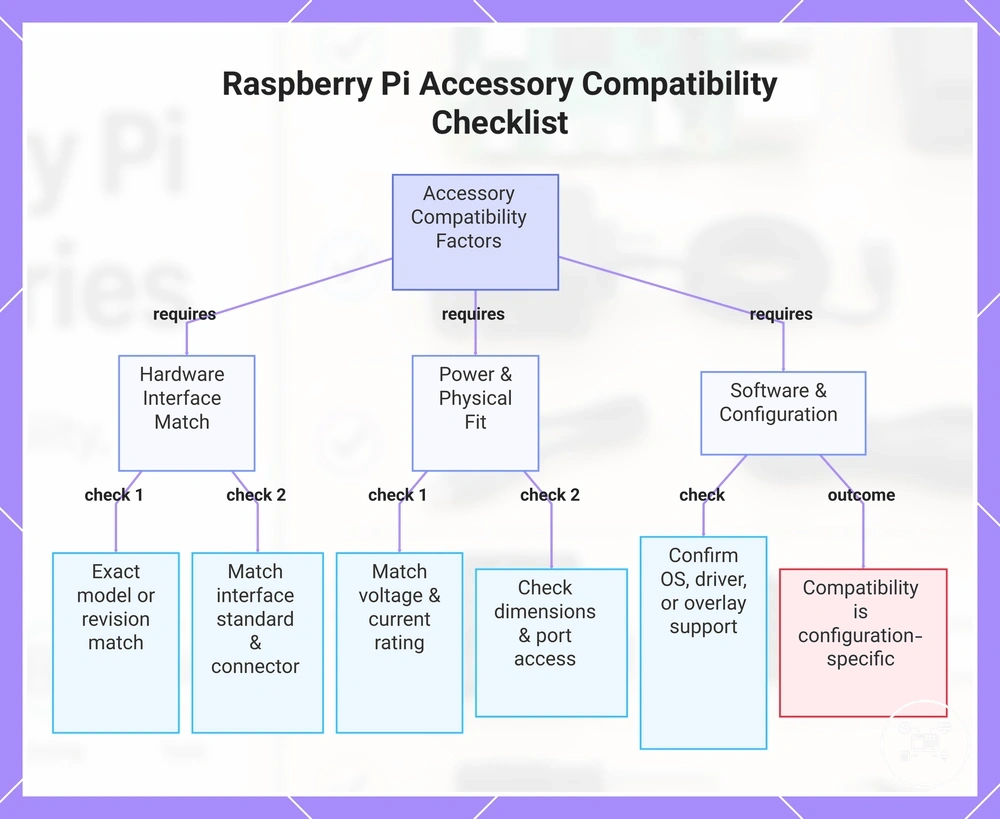
The following checklist separates the main criteria used to assess Raspberry Pi accessories compatibility .
The following checklist separates the main criteria used to assess Raspberry Pi accessories compatibility. Each criterion links an accessory attribute to the board condition that determines whether the accessory can provide its intended function.
- Board model and revision: Confirm that the accessory documentation names the exact Raspberry Pi model or a hardware revision with the same connector layout. Raspberry Pi Documentation specifies that the M.2 HAT+ connects to the PCIe interface on Raspberry Pi 5, so it is not a direct equivalent for boards without that interface.
- Port type and connector size: Match both the interface standard and physical connector. Raspberry Pi Documentation lists Raspberry Pi 4 and Raspberry Pi 5 with two micro-HDMI ports, while Zero-series boards use mini-HDMI, so the same unadapted display cable does not fit both connector types.
- Power voltage and current: Match the supply to the board and connected peripherals. Raspberry Pi Documentation specifies Raspberry Pi 5 operation at 5 V and 5 A for its full power configuration; a 5 V and 3 A supply is supported with a 600 mA peripheral-current limit, which can restrict power available to USB accessories.
- Header and ribbon interfaces: Verify pin count, connector pitch, cable orientation, and interface purpose. Raspberry Pi Documentation lists a 40-pin GPIO header on Raspberry Pi 5 but two 22-pin, 0.5 mm-pitch camera/display connectors, so a GPIO HAT and a camera ribbon cable require different physical interfaces.
- Mechanical clearance: Check case dimensions, mounting points, heatsink height, fan position, and access to ports. A case or cooling accessory is suitable only when its layout leaves the required connectors accessible and does not obstruct another installed component.
- Software and firmware support: Confirm that the operating system, kernel driver, device-tree overlay, or accessory software supports the connected hardware. Raspberry Pi Documentation states that supported audio HATs include a programmed EEPROM for automatic Raspberry Pi OS detection, while other expansion hardware may require manual configuration.
Compatibility therefore remains configuration-specific rather than universal. For example, a Raspberry Pi 5 power accessory rated at 5 V and 5 A supports the documented full-power configuration, whereas a documented 5 V and 3 A configuration imposes a 600 mA limit on connected peripherals; the practical outcome is that a supply can power the board yet still be unsuitable for a setup containing higher-current USB devices. Users should verify the exact board revision, interface, power profile, physical clearance, and software requirement before treating an accessory as suitable.
Compatibility therefore remains configuration-specific rather than universal.
This chart groups the main compatibility criteria for Raspberry Pi accessories into hardware interface, power and physical fit, and software configuration checks.
Choosing Raspberry Pi Accessories Based on Use Case and Setup Goals
Choosing Raspberry Pi accessories should begin with the project's use case because the correct accessory set is determined by the required function rather than by a universal hardware bundle. According to Raspberry Pi Documentation, every Raspberry Pi requires compatible power and boot storage to operate, while accessories such as displays, cooling, cameras, HATs, cases, and GPIO expansion boards are selected only when their functions support the intended workload. This decision-first approach reduces unnecessary hardware and keeps the system aligned with its operating goal.
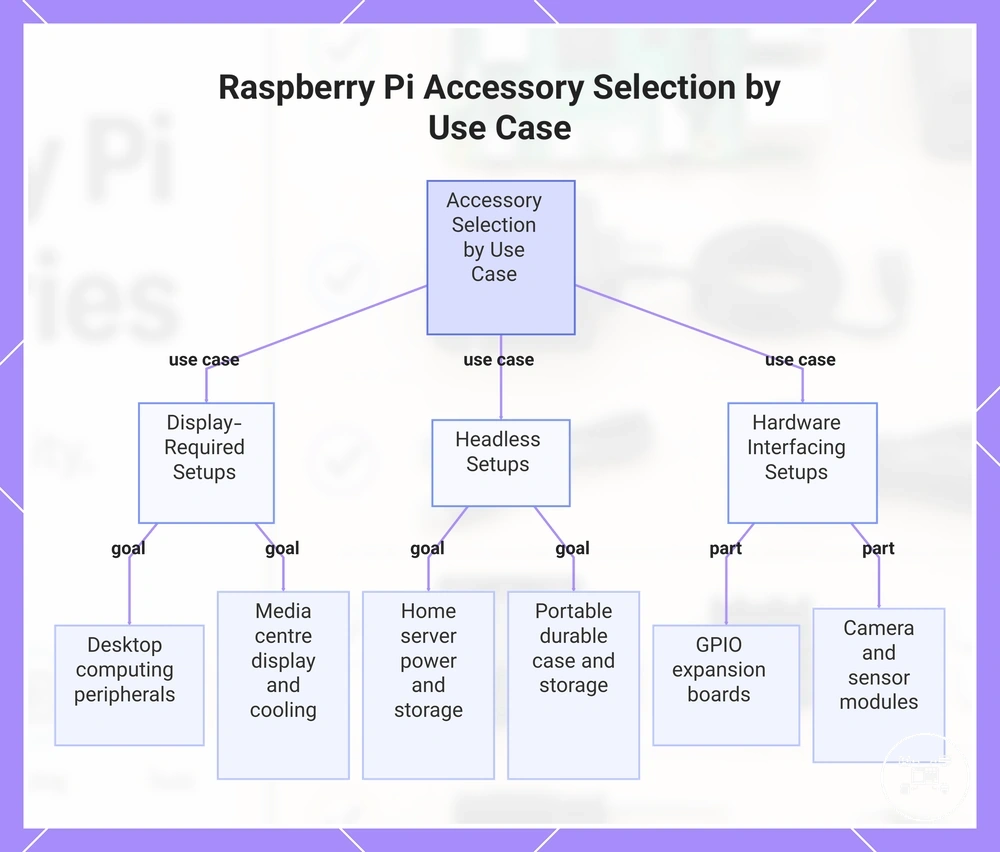
The following checklist connects common setup goals with the accessory selection criteria that matter most.
The following checklist connects common setup goals with the accessory selection criteria that matter most.
- Desktop computing: Select a monitor, keyboard, mouse, and the correct HDMI cable for the Raspberry Pi model. For example, Raspberry Pi Documentation specifies micro-HDMI connectors on Raspberry Pi 4 and Raspberry Pi 5, while Raspberry Pi Zero models use mini-HDMI, so the cable type must match the board.
- Media centre: Prioritize display connectivity, reliable boot storage, stable power, and active cooling if the system is expected to decode video continuously. Cooling becomes more relevant during sustained processor loads than during occasional use.
- Home server: Prioritize a reliable power supply, persistent storage, network connectivity, and a protective case. A local monitor, keyboard, and mouse are commonly required only during initial installation before remote administration is enabled.
- Electronics or robotics: Select GPIO expansion boards, sensors, cameras, or HATs only when the project requires hardware interfacing through the Raspberry Pi GPIO header or camera/display connectors.
- Portable or educational projects: Prioritize a durable enclosure, dependable storage, and compact accessories that simplify repeated transport and classroom deployment.
Different setup goals therefore create different accessory priorities rather than a single best configuration. For example, a Raspberry Pi used as a headless network server can operate without display peripherals after configuration, whereas a desktop workstation requires continuous access to a monitor, keyboard, and mouse. According to Raspberry Pi Documentation, selecting accessories according to workload, supported interfaces, and intended operating environment produces a more efficient Raspberry Pi system than purchasing accessories without a defined project requirement.
Different setup goals therefore create different accessory priorities rather than a single best configuration.
This chart categorizes Raspberry Pi use cases into display-required, headless, and hardware interfacing setups, and shows the accessory priorities for each.
Raspberry Pi Accessory Kits and Individual Components
Raspberry Pi accessory kits prioritise bundled completeness, while individual components prioritise selection flexibility. A kit is suitable when a user needs several coordinated setup items and does not already own them; individual components are suitable when the setup requires only specific functions, must reuse existing hardware, or needs specialised parts. Neither approach is universally superior because the decision impact is determined by required components, existing equipment, and project scope.
The comparison below organises completeness, flexibility, trade-offs, and suitable conditions for each approach.
The comparison below organises completeness, flexibility, trade-offs, and suitable conditions for each approach. The Raspberry Pi accessory kit comparison is most useful when the required component list is established before either option is assessed. :contentReference[oaicite:0]{index=0}
| Option | Attribute | Trade-off | Suitable condition |
|---|---|---|---|
| Accessory kit | Completeness: multiple setup components are supplied as one predefined group | Reduces separate selection work but can include duplicated or unnecessary components | Suitable when a new setup requires most of the included component categories and the bundle matches the board model |
| Individual components | Flexibility: each accessory is selected for one defined setup requirement | Improves control over function and specification but requires a separate suitability check for every component | Suitable when the user already owns part of the setup, needs an upgrade, or requires specialised hardware |
The practical trade-off is between receiving a predefined group and controlling every component choice. For example, suppose a setup requires five accessory categories and the user already owns three compatible categories: selecting the remaining two components avoids duplicating three items, while a five-category kit may be more convenient when none of those accessories is available. This illustrative comparison shows that kit completeness adds value when most included parts are required, whereas individual selection adds value when the missing requirements are limited or specialised.
Setting Up Raspberry Pi Accessories Together
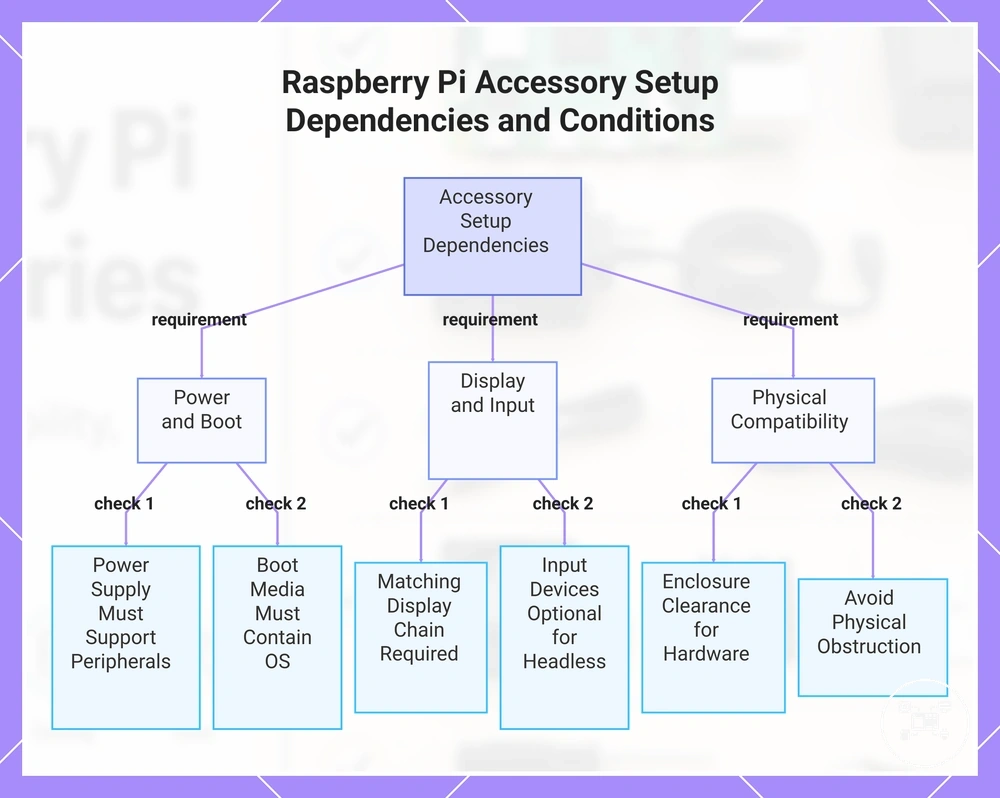
Raspberry Pi accessories work together only when each component fulfils its required setup dependency: the power supply energises the board, boot storage provides the operating system, connection accessories carry data or video, and input or expansion devices provide the intended control or hardware function. Raspberry Pi Documentation identifies six elements for a locally operated setup—boot media, power supply, display, display cable, keyboard, and mouse—while a remotely managed configuration can omit the display and input devices after network access is configured. :contentReference[oaicite:0]{index=0}
The following checklist shows how the main accessory combinations affect the completed setup.
The following checklist shows how the main accessory combinations affect the completed setup.
- Power supply and peripherals: The power source must support both the Raspberry Pi board and devices drawing power through its USB ports; insufficient available power can restrict peripherals or produce unstable operation.
- Boot storage and operating system: A microSD card or supported external drive must contain a compatible operating system image; without valid boot media, the board cannot complete startup.
- Display and video cable: The board output, cable connector, and display input must form one supported connection path; matching only two of these three elements does not provide local video output.
- Keyboard, mouse, and remote access: Local input devices provide direct control during desktop use or initial configuration, while a headless setup can operate without them after remote administration is enabled.
- Case, cooling, and expansion hardware: The enclosure must provide clearance for the installed cooler, HAT, camera cable, or GPIO accessory; physical obstruction can prevent a valid accessory combination even when each component functions separately.
This overview defines accessory relationships rather than a complete installation or diagnostic procedure. Use the dedicated Raspberry Pi accessories setup guidance for connection order and configuration steps, and consult Raspberry Pi accessories troubleshooting when a connected component is not detected, receives insufficient power, or fails to produce the expected result.
This overview defines accessory relationships rather than a complete installation or diagnostic procedure.
This chart shows the main dependency conditions for setting up Raspberry Pi accessories, covering power, boot, display, input, and physical compatibility requirements.