Raspberry Pi Accessories Compatibility Guide
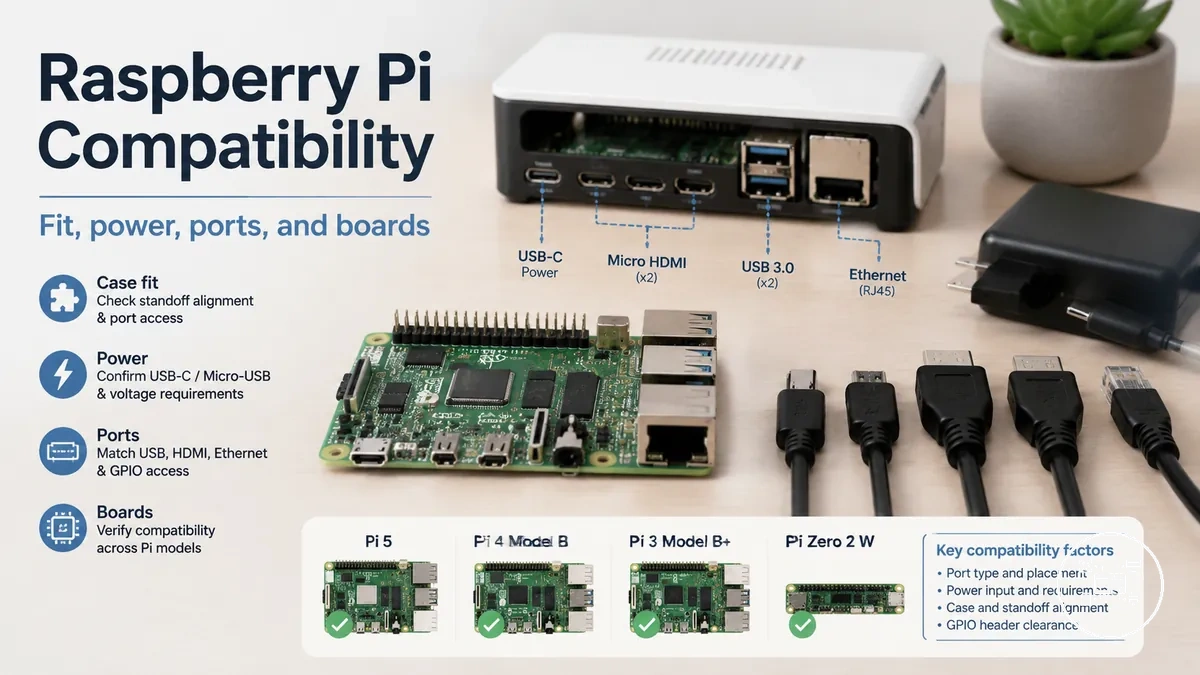
Raspberry Pi accessories are compatible only when the accessory matches the target board model, physical layout, connector type, electrical requirement, and intended operating condition. Compatibility is therefore conditional rather than universal: a case, cable, power supply, cooling component, display, or expansion board can be suitable for one Raspberry Pi model and unsuitable for another.
Raspberry Pi accessories are compatible only when the accessory matches the target board model, physical layout, connector type, electrical requirement, and intended operating condition.
Raspberry Pi accessories should be checked against four compatibility conditions: the supported board generation, the required interface, the enclosure or mounting fit, and the specified power input. Raspberry Pi documentation lists Raspberry Pi 4 Model B with two micro-HDMI ports, a 40-pin GPIO header, USB-C power at 5 V and 3 A, and separate 15-pin CSI and DSI connectors; it lists Raspberry Pi 5 with two micro-HDMI ports, a 40-pin GPIO header, USB-C power at 5 V and 5 A, and two 22-pin combined CSI/DSI connectors.
- Board support: The accessory documentation must explicitly include the intended Raspberry Pi model or board generation.
- Connection match: The accessory plug, socket, pin arrangement, or ribbon-cable format must match the corresponding board interface.
- Physical fit: A case or mounted accessory must align with the board outline, mounting points, component clearances, ventilation path, and port positions.
- Electrical match: A power accessory must provide the board's specified voltage and current under the connected peripheral load.
For example, Raspberry Pi specifies 5 V at 5 A, equivalent to 25 W, for Raspberry Pi 5 when full peripheral power is required. Raspberry Pi also states that Raspberry Pi 5 can operate from a 5 V, 3 A supply, but this configuration limits downstream peripheral current to 600 mA; a high-current USB storage device may therefore require the 5 A configuration.
Model labels alone do not close every compatibility check.
Model labels alone do not close every compatibility check. Raspberry Pi identifies its official Raspberry Pi 4 Case as designed for Raspberry Pi 4, while its Raspberry Pi 5 Case is designed for Raspberry Pi 5 and includes a fan connection specific to that board's cooling arrangement; the practical decision is to verify the exact board model and every required interface before selecting the accessory.
Table of Contents
Raspberry Pi Accessories Compatibility Scope and Fit Requirements
Raspberry Pi accessories compatibility means that an accessory matches the target board’s model, connection interface, physical layout, electrical requirement, and intended function. The scope covers cases, power supplies, cables, displays, storage adapters, cooling components, USB devices, and GPIO expansion hardware within the broader Raspberry Pi accessories hub.
The image below shows the board, connector, power, and use-condition checks that determine the fit outcome.
An accessory is suitable only when every required fit condition is satisfied; matching one connector or mounting point does not establish complete compatibility. The image below shows the board, connector, power, and use-condition checks that determine the fit outcome.
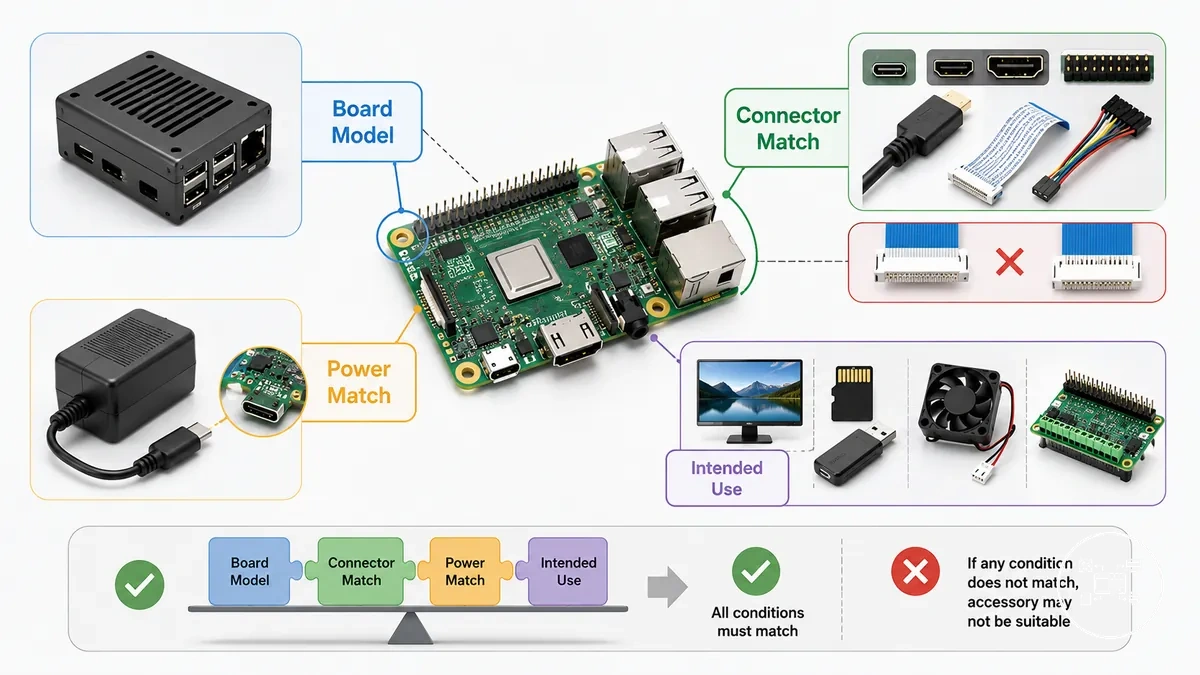
- Board version: The accessory documentation must identify the intended Raspberry Pi model or a hardware feature supplied by that model. Raspberry Pi Documentation specifies that the Build HAT fits computers with a 40-pin GPIO header, while keyboard-series devices require a ribbon cable or another extension device.
- Connector: The accessory plug, socket, pin arrangement, and cable format must match the board interface. Raspberry Pi Documentation states that flagship boards up to and including Raspberry Pi 4 use a standard 15-pin camera connector, whereas Raspberry Pi 5 uses a mini 22-pin connector and therefore requires a Standard-Mini camera cable.
- Power: The power supply must provide the voltage and current specified for the board under the intended peripheral load. Raspberry Pi Documentation specifies 5 V at 3 A, equal to 15 W, for Raspberry Pi 4 Model B and 5 V at 5 A, equal to 25 W, for Raspberry Pi 5; using a 5 V, 3 A supply with Raspberry Pi 5 restricts available peripheral current to 600 mA.
- Intended use: The accessory must support the required function and every stated adapter, software, mounting, or cooling condition. A physical connection confirms only mechanical or interface fit, not complete functional support.
For example, Raspberry Pi Documentation specifies that the original Touch Display has a 15-way display connector, while connection to Raspberry Pi 5 requires a 22-way-to-15-way flexible flat cable. The display remains supported under that cable condition, but the supplied 15-way cable alone does not match the Raspberry Pi 5 connector.
The display remains supported under that cable condition, but the supplied 15-way cable alone does not match the Raspberry Pi 5 connector.
Accessory fit should therefore be checked against the exact board model, connector specification, power requirement, physical clearance, and intended workload before selection. When the accessory manufacturer does not identify the supported model or required operating condition, compatibility remains unverified rather than universally applicable.
Raspberry Pi Board Versions and Accessory Compatibility
Raspberry Pi board versions determine accessory compatibility because each generation can differ in connector type, physical layout, power specification, and supported interfaces. According to Raspberry Pi Documentation, accessories should be selected for the specific Raspberry Pi model or for the documented hardware interface they support rather than assuming compatibility across all Raspberry Pi boards.
The board differences below illustrate the hardware characteristics that most often affect accessory selection.
The board differences below illustrate the hardware characteristics that most often affect accessory selection.
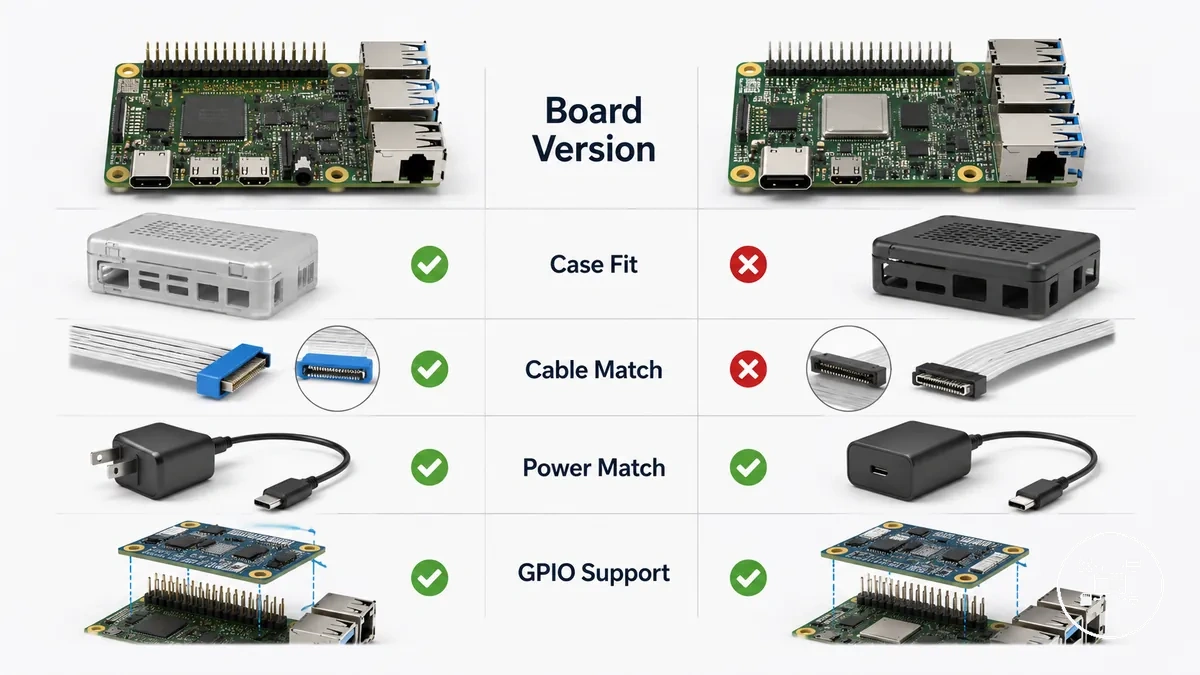
- Board version → Cases and cooling: Raspberry Pi 5 has a revised board layout and component placement compared with Raspberry Pi 4 Model B, so enclosures, active coolers, and heatsinks must specifically list Raspberry Pi 5 support. A Raspberry Pi 4 enclosure is not automatically compatible with Raspberry Pi 5 because connector and component locations differ.
- Board version → Camera and display accessories: According to Raspberry Pi Documentation, Raspberry Pi 4 Model B uses separate 15-pin CSI and DSI connectors, whereas Raspberry Pi 5 uses 22-pin CSI/DSI connectors. Existing official cameras and displays remain usable only when the required 22-pin-to-15-pin adapter cable is installed.
- Board version → Power accessories: Raspberry Pi Documentation recommends a 5 V, 3 A USB-C power supply for Raspberry Pi 4 Model B and a 5 V, 5 A USB-C power supply for Raspberry Pi 5. Raspberry Pi also states that Raspberry Pi 5 can operate from a 5 V, 3 A supply, but available current for connected USB peripherals is reduced to 600 mA.
- Board version → Expansion hardware: HATs that follow the standard 40-pin GPIO specification are generally compatible across supported Raspberry Pi boards, but manufacturer documentation should also confirm mechanical clearance, firmware support, and any board-specific installation requirements.
For example, according to Raspberry Pi Documentation, the official Raspberry Pi Camera Module can be connected to both Raspberry Pi 4 Model B and Raspberry Pi 5. However, Raspberry Pi 5 requires a Standard-to-Mini camera cable because the board uses a 22-pin connector instead of the earlier 15-pin interface. The camera remains compatible, but the cable requirement changes with the board generation.
The camera remains compatible, but the cable requirement changes with the board generation.
Checking the exact Raspberry Pi board version before purchasing an accessory helps prevent connector mismatches, enclosure fit problems, unsupported cooling hardware, and insufficient power delivery. When an accessory manufacturer does not explicitly identify supported Raspberry Pi models or hardware revisions, compatibility should be treated as unverified rather than assumed.
Physical Fit, Ports, and Connector Compatibility
Physical fit, ports, and connector compatibility determine whether a Raspberry Pi accessory can be installed and function correctly with a specific board. Compatibility requires the accessory's connector type, physical dimensions, mounting arrangement, and port access to match the target Raspberry Pi model. According to Raspberry Pi Documentation, mechanical layout and interface specifications are board-specific, so physical compatibility should be verified before installation.
The annotated illustration below highlights the physical areas that should be checked before installing an accessory.
The annotated illustration below highlights the physical areas that should be checked before installing an accessory.
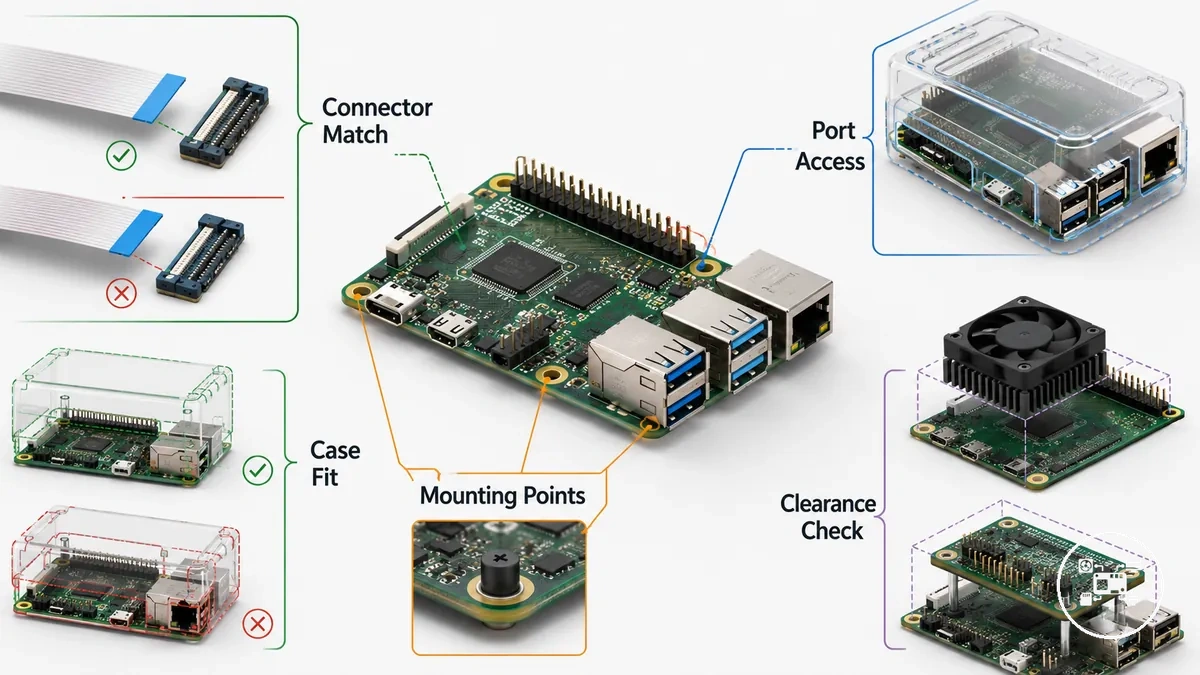
- Connector compatibility: The accessory connector must match the board interface. According to Raspberry Pi Documentation, Raspberry Pi 4 Model B uses separate 15-pin CSI and DSI connectors, while Raspberry Pi 5 uses 22-pin CSI/DSI connectors. Camera and display accessories designed for earlier boards therefore require compatible adapter cables when used with Raspberry Pi 5.
- Port accessibility: USB, Ethernet, micro-HDMI, audio, and USB-C power ports must remain unobstructed after installation. A mechanically compatible enclosure becomes functionally incompatible if it blocks access to required external connectors.
- Physical dimensions: Cases, HATs, heatsinks, and cooling assemblies must align with the board outline, mounting-hole positions, connector locations, and component clearances. When selecting an enclosure, verify case fit and board access to ensure that physical protection does not restrict cable installation or port access.
- Clearance requirements: Expansion boards and cooling hardware require sufficient vertical and horizontal space above surrounding components. An accessory that contacts neighbouring components or prevents ribbon-cable routing should be treated as physically incompatible even if its connector fits correctly.
For example, according to Raspberry Pi Documentation, the official Camera Module remains compatible with Raspberry Pi 5 when a Standard-to-Mini camera cable converts the previous 15-pin camera connection to the newer 22-pin interface. Similarly, a case that physically accepts the board but covers one of the dual micro-HDMI outputs prevents simultaneous display access despite matching the board dimensions.
Similarly, a case that physically accepts the board but covers one of the dual micro-HDMI outputs prevents simultaneous display access despite matching the board dimensions.
Checking connector type, port accessibility, board dimensions, mounting-hole alignment, and component clearance before purchasing an accessory helps prevent installation problems and unnecessary adapter purchases. Physical compatibility should therefore be confirmed using both the board specifications and the accessory manufacturer's supported installation requirements rather than connector shape alone.
Power Supply Compatibility and Electrical Requirements
Power supply compatibility determines whether Raspberry Pi accessories receive sufficient and stable electrical power for reliable operation. A compatible power supply must match the Raspberry Pi board's required input voltage, connector type, and current capacity while supporting the combined electrical load of the board and connected accessories. According to Raspberry Pi Documentation, Raspberry Pi 4 Model B is designed for a 5.1 V USB-C power supply rated at 3 A, while Raspberry Pi 5 is designed for a 5 V USB-C power supply rated at 5 A to enable full board and peripheral power capability.
Electrical compatibility depends on three criteria: connector compatibility, output capacity, and accessory load.
Electrical compatibility depends on three criteria: connector compatibility, output capacity, and accessory load. Raspberry Pi Documentation specifies USB-C power input for both Raspberry Pi 4 Model B and Raspberry Pi 5, but the recommended current differs by model. For more detailed guidance on selecting suitable adapters and official power accessories, see power compatibility for Raspberry Pi accessories.
- Connector compatibility: The power connector must match the board input. Raspberry Pi 4 Model B and Raspberry Pi 5 both use USB-C power connectors, whereas earlier Raspberry Pi models such as Raspberry Pi 3 Model B+ use Micro-USB.
- Current capacity: According to Raspberry Pi Documentation, Raspberry Pi 4 Model B requires a recommended 5.1 V, 3 A supply, while Raspberry Pi 5 recommends a 5 V, 5 A supply when peripherals require the full available USB power budget.
- Accessory load: USB SSDs, external hard drives, displays, HATs, cooling fans, cameras, and other peripherals increase total power consumption. The combined electrical load should remain within the power supply's rated output to reduce the likelihood of undervoltage warnings, peripheral disconnection, or reduced USB power availability.
For example, according to Raspberry Pi Documentation, Raspberry Pi 5 can operate from a 5 V, 3 A USB-C power supply, but downstream USB peripheral current is limited to approximately 600 mA under that condition. Using the recommended 5 V, 5 A power supply enables the higher USB peripheral current budget available on Raspberry Pi 5, improving compatibility with power-hungry USB accessories.
Using the recommended 5 V, 5 A power supply enables the higher USB peripheral current budget available on Raspberry Pi 5, improving compatibility with power-hungry USB accessories.
Matching the correct voltage, connector type, and current rating before connecting accessories improves electrical compatibility and reduces the risk of unstable operation caused by insufficient available power. If an accessory manufacturer specifies additional electrical requirements beyond those of the Raspberry Pi board, those requirements should also be satisfied before considering the complete hardware configuration electrically compatible.
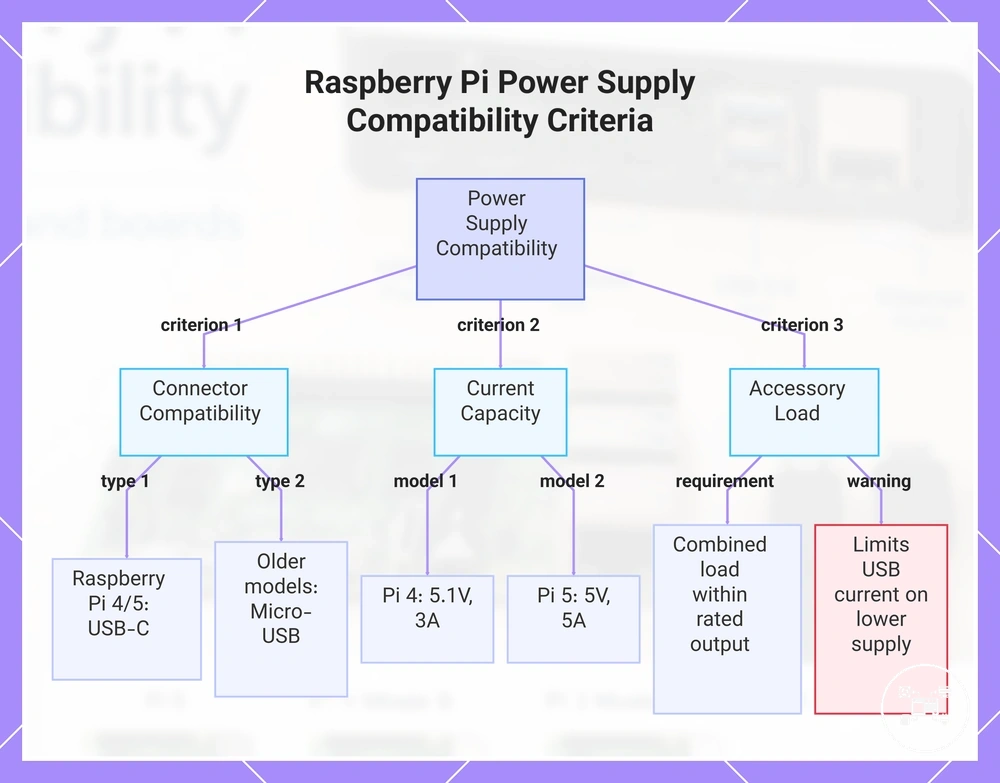
This chart shows the three main criteria for ensuring electrical compatibility between a Raspberry Pi board and its power supply, including connector type, current capacity, and accessory load.
This chart shows the three main criteria for ensuring electrical compatibility between a Raspberry Pi board and its power supply, including connector type, current capacity, and accessory load.
GPIO Accessory Compatibility and Expansion Connections
GPIO accessory compatibility requires the expansion board to match the Raspberry Pi computer’s header format, pin functions, electrical levels, supported interfaces, and software requirements. Raspberry Pi Documentation states that current Raspberry Pi boards use a 40-pin GPIO header with 2.54 mm pin spacing, but a matching header does not establish full functional compatibility. :contentReference[oaicite:0]{index=0}
More detailed selection guidance is available under GPIO accessory compatibility .
Before connecting an expansion board, verify its required GPIO pins, communication interface, board support, electrical limits, and installation method. More detailed selection guidance is available under GPIO accessory compatibility.
- Header connection: The GPIO accessory must use the target board’s 40-pin header or a compatible extension connection. Raspberry Pi Zero models with an unpopulated header require soldered pins or a suitable pin kit before a conventional HAT can connect physically. :contentReference[oaicite:1]{index=1}
- Interface support: The accessory must use GPIO pins assigned to the required function, such as I²C, SPI, UART, PWM, or general digital input and output. Physical alignment alone is insufficient when the accessory requires an interface, driver, overlay, or pin assignment that the selected configuration does not provide.
- Expansion-board support: A HAT or GPIO board must identify the supported Raspberry Pi models and any required operating-system or firmware conditions. An identification EEPROM can assist configuration on a compliant HAT, but the accessory documentation must still confirm its functional requirements.
- Mechanical connection: The accessory must align with the header orientation, mounting points, and required clearance. Keyboard-series Raspberry Pi computers expose a 40-pin GPIO header externally, but Raspberry Pi Documentation states that the Build HAT requires a ribbon cable or another extension device for these models. :contentReference[oaicite:2]{index=2}
For example, Raspberry Pi Documentation specifies that the Build HAT fits Raspberry Pi computers with a 40-pin GPIO header and supports up to four compatible motors or sensors. On a keyboard-series Raspberry Pi computer, the same GPIO interface remains available, but the enclosure prevents direct vertical mounting, so a ribbon cable or extension device becomes a required compatibility condition. :contentReference[oaicite:3]{index=3}
When an accessory supplier identifies only the pin count without documenting these conditions, functional compatibility remains unverified.
GPIO compatibility should therefore be confirmed through the complete connection path: board model, 40-pin header availability, required pin functions, electrical conditions, mechanical installation, and software support. When an accessory supplier identifies only the pin count without documenting these conditions, functional compatibility remains unverified.
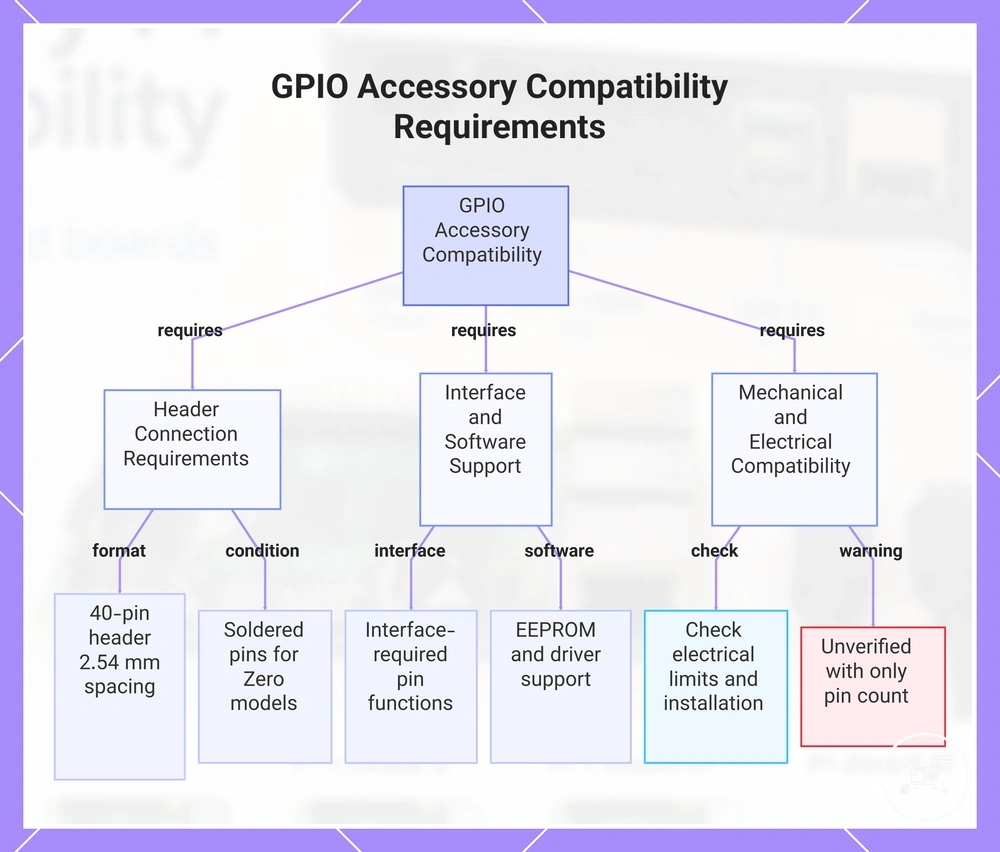
This chart shows the main compatibility requirements for connecting a GPIO accessory to a Raspberry Pi, including header, interface, software, and mechanical conditions.
This chart shows the main compatibility requirements for connecting a GPIO accessory to a Raspberry Pi, including header, interface, software, and mechanical conditions.
Display Cable Compatibility and Interface Requirements
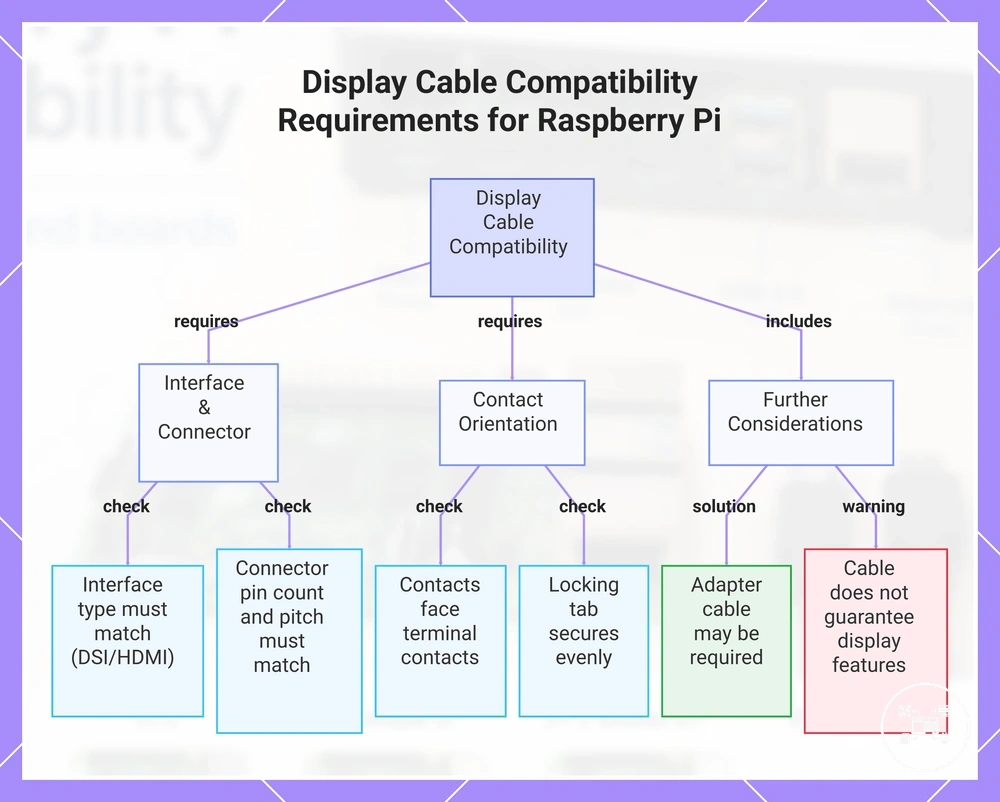
Display cable compatibility requires the Raspberry Pi board, cable, and display accessory to use the same interface, connector format, contact orientation, and supported signal path. Raspberry Pi Documentation specifies that Raspberry Pi 4 Model B has one standard 15-pin, 1.0 mm-pitch DSI connector, while Raspberry Pi 5 has two mini 22-pin, 0.5 mm-pitch combined CSI/DSI connectors; a cable intended for one connector format does not connect directly to the other.
For deeper coverage of these criteria, see display and cable compatibility .
Check the board-side connector, display-side connector, interface type, cable orientation, and any required adapter before installation. For deeper coverage of these criteria, see display and cable compatibility.
- Interface type: The display accessory and Raspberry Pi must share a supported connection path, such as DSI or HDMI. A cable that fits a connector cannot convert HDMI signalling into DSI signalling, so connector shape and interface type must both match.
- Connector format: Raspberry Pi Documentation lists Raspberry Pi 4 Model B with a 15-pin, 1.0 mm-pitch DSI connector and Raspberry Pi 5 with 22-pin, 0.5 mm-pitch CSI/DSI connectors. Connecting a 15-pin display accessory to Raspberry Pi 5 therefore requires a supported 22-way-to-15-way flexible cable rather than the original 15-way cable alone.
- Contact orientation: The cable contacts must face the terminal contacts specified for both sockets, and each locking tab must secure the cable evenly. Matching pin counts do not establish compatibility when the contacts are reversed or the cable pinout differs.
- Display capability: Cable compatibility establishes the connection path but does not establish the display's resolution, refresh rate, touch support, power requirement, or software support. Those attributes must remain within the capabilities documented for the Raspberry Pi output and the connected display.
For example, Raspberry Pi Documentation states that the original Raspberry Pi Touch Display uses a 15-way DSI connection and that Raspberry Pi 5 requires a 22-way-to-15-way flat flexible cable for that display. Under this condition, the display can use a Raspberry Pi 5 DSI port; without the conversion cable, the board's 22-pin socket and the display's 15-way cable do not form a compatible physical connection.
A compatible cable cannot add a resolution, touch function, or interface capability that the board or display does not support.
Display cable compatibility should therefore be confirmed from the complete connection chain: Raspberry Pi model, output interface, connector format, cable pin arrangement, display input, and documented adapter requirement. A compatible cable cannot add a resolution, touch function, or interface capability that the board or display does not support.
This chart shows the main criteria for display cable compatibility between Raspberry Pi boards and display accessories, including interface, connector, orientation, and additional checks.
This chart shows the main criteria for display cable compatibility between Raspberry Pi boards and display accessories, including interface, connector, orientation, and additional checks.
Selecting Compatible Raspberry Pi Accessories
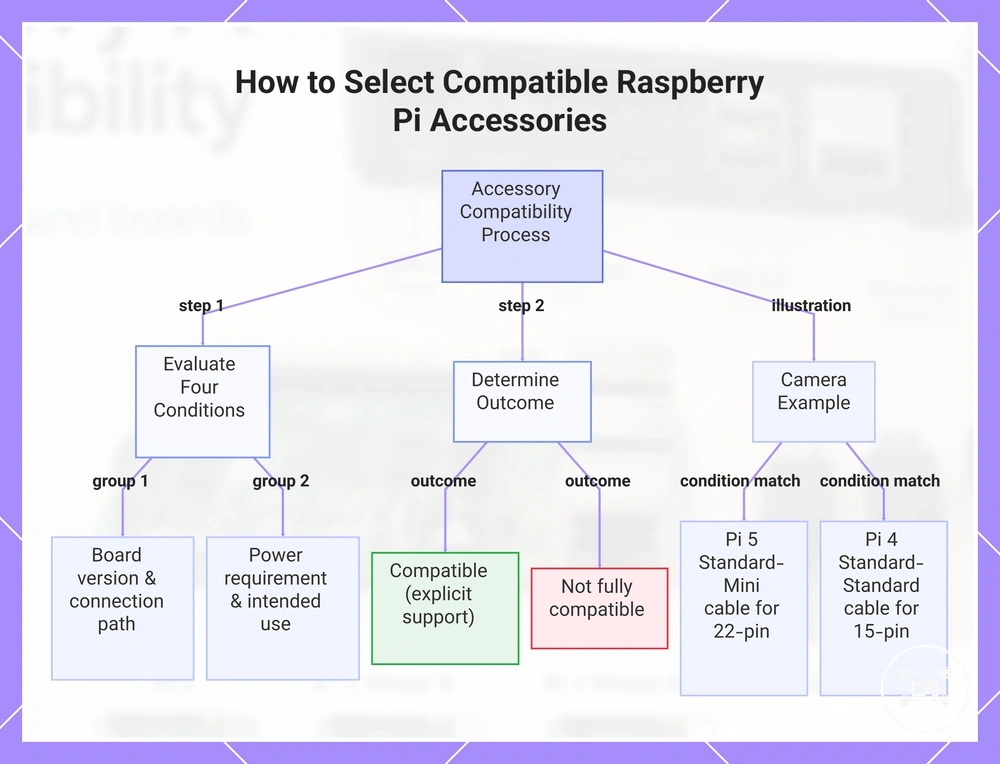
Select Raspberry Pi accessories by evaluating four conditions in order: the exact board version, required connector or interface, electrical requirement, and intended use. Treat an accessory as compatible only when its documentation closes all four conditions for the planned configuration; a matching product name, plug shape, or mounting pattern alone is not sufficient.
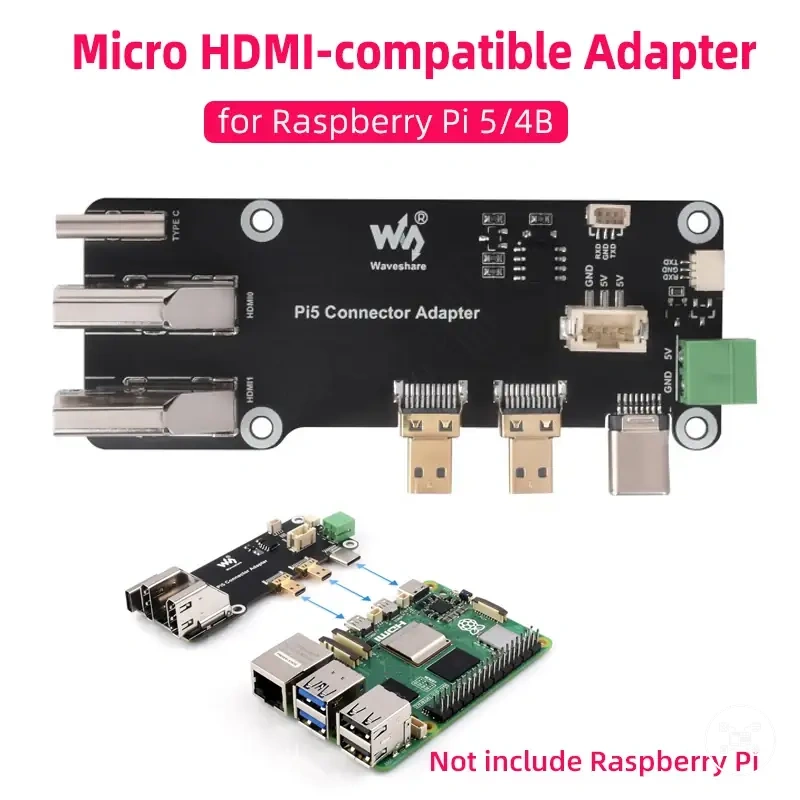
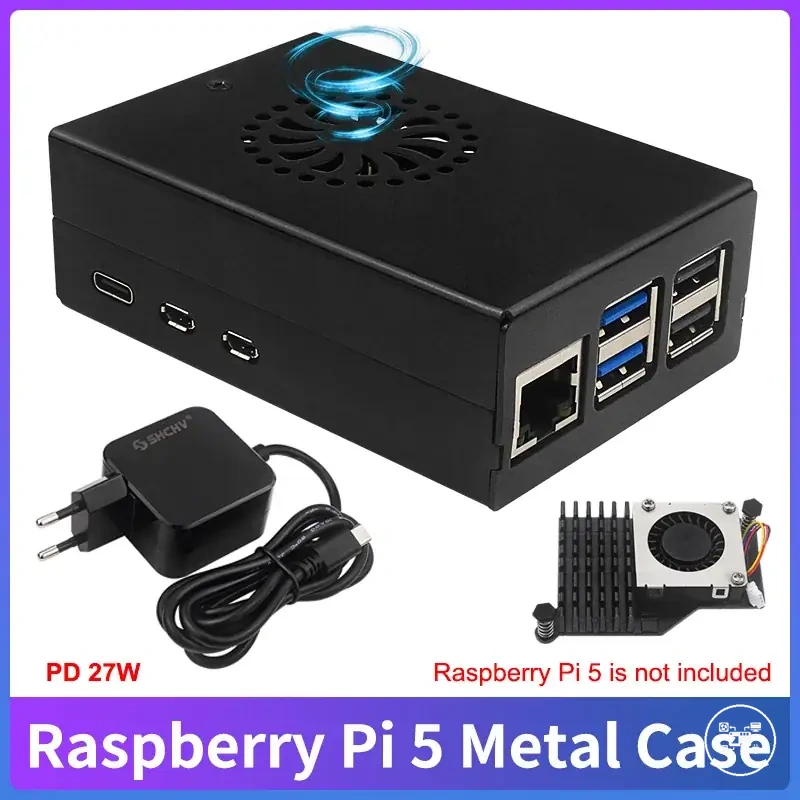
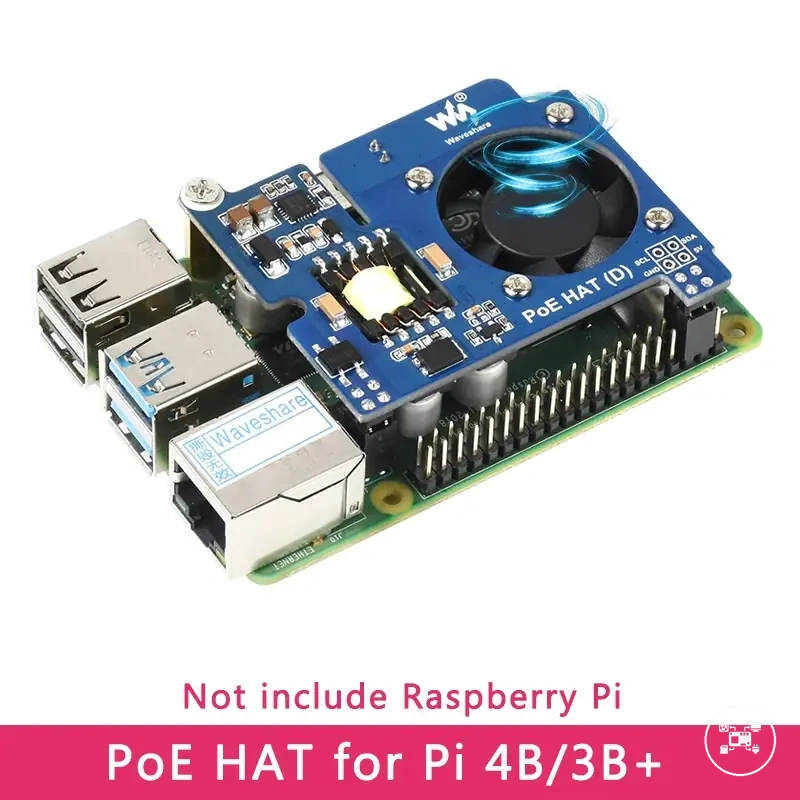
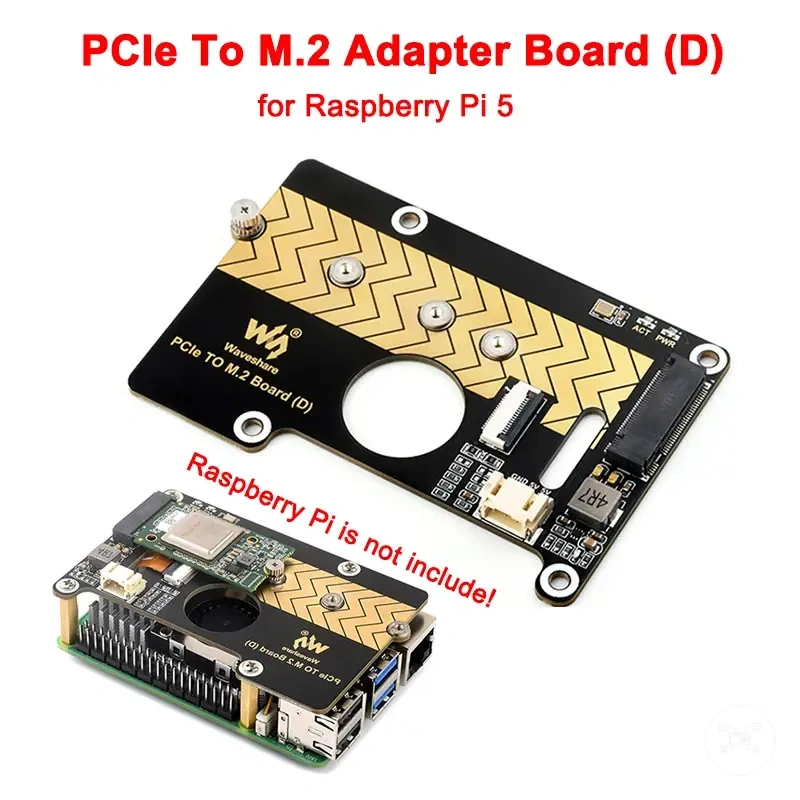
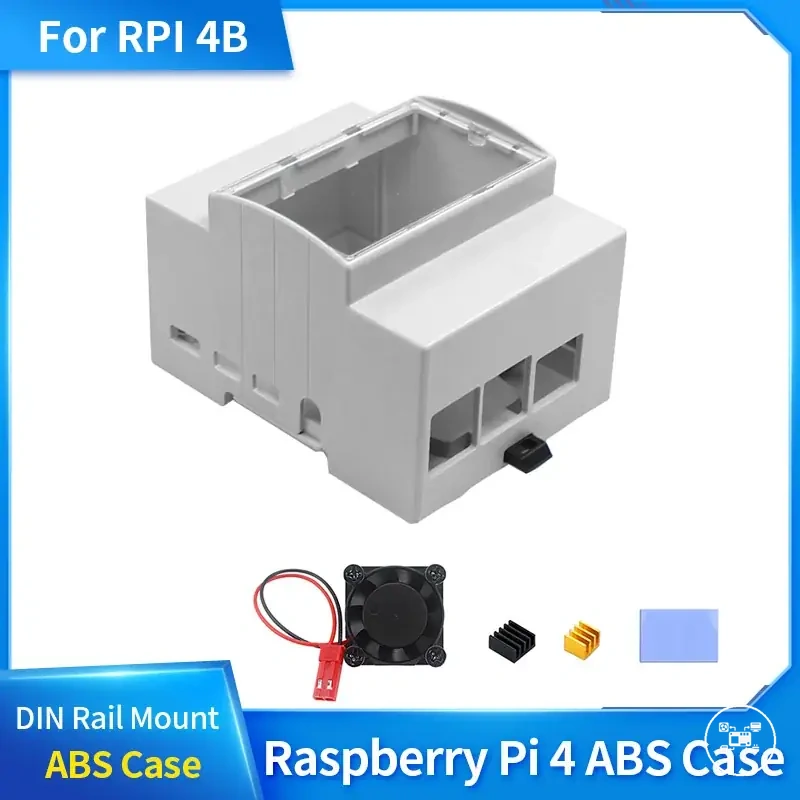
The products below are useful examples for comparing available options.
The products below are useful examples for comparing available options. Before buying, check that the compatibility criteria, key features, and product details match your needs.
- Match the board version: Identify the exact Raspberry Pi model and revision, then confirm that the accessory documentation names that board or a hardware feature it provides. The decision outcome is compatible when support is explicit, conditional when an adapter or extension is specified, and unverified when no supported model or equivalent interface is documented.
- Match the connection path: Compare the connector at both ends, the interface carried through it, and any required cable or adapter. Raspberry Pi Documentation specifies that flagship boards up to Raspberry Pi 4 use a standard 15-pin camera connector, while Raspberry Pi 5 uses a mini 22-pin connector; a camera for both generations therefore requires a Standard-Standard cable for Raspberry Pi 4 or a Standard-Mini cable for Raspberry Pi 5.
- Match the power requirement: Compare the board input specification with the power available after connected accessories are included. Raspberry Pi Documentation lists Raspberry Pi 4 Model B at 5 V, 3 A and Raspberry Pi 5 at 5 V, 5 A for full peripheral power; Raspberry Pi 5 can use 5 V, 3 A, but that condition limits peripheral current to 600 mA.
- Match the intended use: Confirm that the accessory supports the required function, operating system, firmware, driver, mounting method, and workload. Select the accessory only when these conditions support the planned result; physical attachment without documented functional support leaves compatibility unverified.
For example, selecting a camera for Raspberry Pi 5 requires three separate matches: support for Raspberry Pi camera software, a Standard-Mini cable for the board's 22-pin connector, and installation that leaves the connector and cable path accessible. According to Raspberry Pi Documentation, the same camera used with Raspberry Pi 4 instead uses the supplied Standard-Standard cable for its 15-pin connector, so the compatible accessory package changes even though the camera module can remain the same.
Use product examples only after this evaluation has produced a documented match rather than using the product listing as evidence of compatibility.
Record the board model and intended task first, then reject any accessory whose interface, power condition, installation requirement, or supported function remains unspecified. Use product examples only after this evaluation has produced a documented match rather than using the product listing as evidence of compatibility.
This chart shows the step-by-step process for evaluating accessory compatibility, including the four conditions to check, the possible outcomes, and a camera example.
This chart shows the step-by-step process for evaluating accessory compatibility, including the four conditions to check, the possible outcomes, and a camera example.
Common Raspberry Pi Accessory Compatibility Issues
Common Raspberry Pi accessory compatibility issues appear as hardware that does not fit, connect, power on, remain detected, or provide its documented function. The likely compatibility factor is a mismatch in board version, physical clearance, port access, cable format, available power, or software support; the next check should compare the observed symptom with the board and accessory documentation rather than assume that the accessory is faulty.
- Physical fit issue: The symptom is misaligned mounting holes, blocked connectors, contact with board components, or insufficient clearance for a cable, HAT, case, or cooler. The possible cause is an accessory designed for another Raspberry Pi layout; check the exact supported board model, mounting pattern, component clearance, and required port access.
- Power or disconnection issue: The symptom is an accessory that resets, disconnects under load, or receives less USB power than expected. Raspberry Pi Documentation specifies that Raspberry Pi 5 uses a 5 V, 5 A supply for its full peripheral power budget, while operation from a 5 V, 3 A supply limits downstream peripheral current to 600 mA; check the supply rating and the combined load of connected accessories.
- Cable mismatch: The symptom is a ribbon cable that is too wide, too narrow, reversed, or unable to lock into the socket. Raspberry Pi Documentation identifies 15-pin camera and display connectors on Raspberry Pi 4 Model B and 22-pin combined CSI/DSI connectors on Raspberry Pi 5; check the connector at both ends, contact orientation, interface type, and any required conversion cable.
- Blocked port: The symptom is an accessory that fits mechanically but prevents access to HDMI, USB, Ethernet, power, GPIO, or a ribbon-cable socket. The possible cause is an enclosure or stacked accessory that does not preserve the required connection path; check every port needed by the complete configuration before treating the installation as compatible.
- Detected but not functional: The symptom is a connected HAT, display, camera, fan, or controller that does not provide its documented feature. The possible cause is unsupported firmware, operating-system support, driver, device-tree overlay, interface assignment, or board generation; check the supplier's supported software and hardware conditions because physical pin alignment does not establish full functionality.
For example, Raspberry Pi Documentation states that the original Raspberry Pi Touch Display uses a 15-way DSI connection, while Raspberry Pi 5 requires a 22-way-to-15-way flexible cable. If the display remains blank when the original 15-way cable is used with Raspberry Pi 5, the next compatibility check is the cable format because the board and supplied cable use different connector sizes.
Before buying, check that the compatibility criteria, key features, and product details match your needs.
The products below are useful examples for comparing available options. Before buying, check that the compatibility criteria, key features, and product details match your needs.
When the symptom remains after the documented board, fit, power, port, cable, and software conditions have been checked, record the exact Raspberry Pi model, accessory model, power-supply rating, connection path, and observed behaviour before consulting guidance for accessory compatibility problems. Product examples should illustrate a documented condition rather than serve as evidence that an unresolved configuration is compatible.
Product examples should illustrate a documented condition rather than serve as evidence that an unresolved configuration is compatible.
This chart shows the main categories of accessory compatibility issues for Raspberry Pi, the key checks for each, and a recommended diagnostic approach.