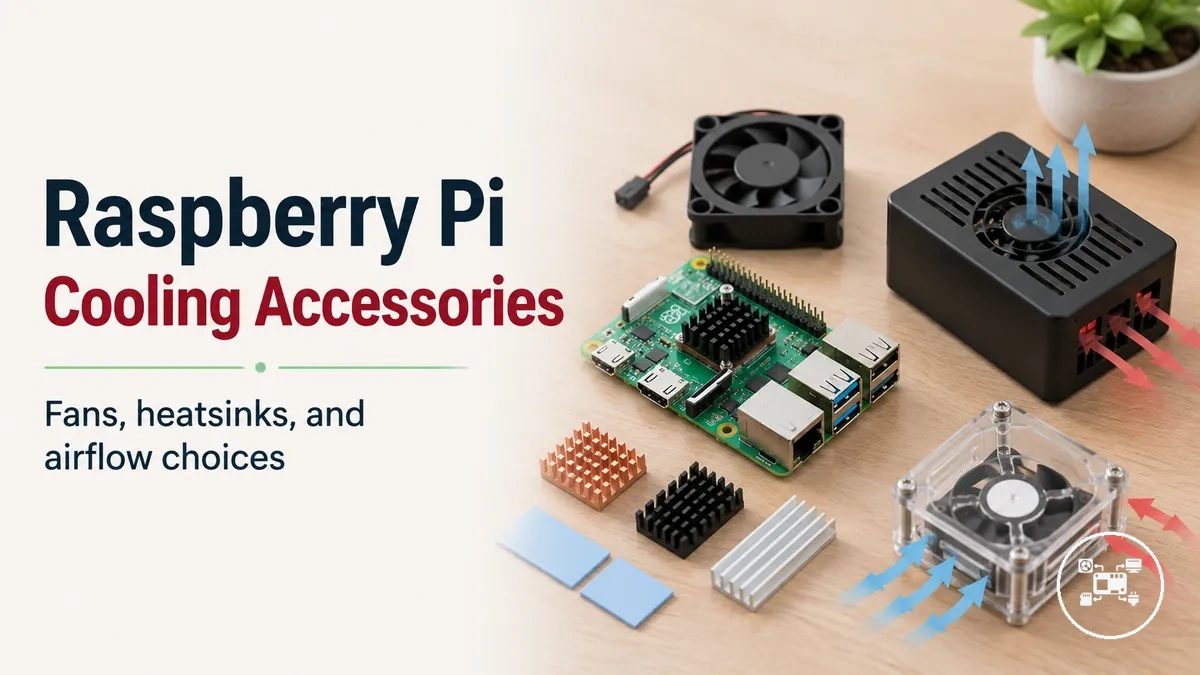
Raspberry Pi Cooling Accessories: Fans, Heatsinks, and Airflow Choices
Raspberry Pi cooling accessories are hardware components that improve thermal management by removing heat from the processor through heatsinks, increasing airflow with fans, or combining both approaches. Raspberry Pi Ltd. classifies its official cooling products into passive and active solutions for supported Raspberry Pi boards, while the cooling method that delivers the greatest benefit depends on the board model, enclosure design, ambient temperature, and sustained workload rather than on a universally superior accessory. This overview explains how cooling approaches relate to usage conditions so that cooling choices can be evaluated before comparing individual products.
This overview explains how cooling approaches relate to usage conditions so that cooling choices can be evaluated before comparing individual products.
Raspberry Pi cooling accessories become more important when processor utilisation remains high for extended periods, such as during software compilation, media transcoding, continuous server operation, computer vision, or AI inference. According to Raspberry Pi Ltd., Raspberry Pi 5 is designed to operate with an official Active Cooler or an officially supported case with integrated fan when sustained performance is required because the processor automatically manages clock speed if thermal limits are reached. As a practical example, independent stress testing by Tim Downey measured Raspberry Pi 4 cooling solutions under approximately 179 seconds of continuous CPU load, demonstrating that active coolers generally maintain lower operating temperatures than passive heatsinks under identical test conditions, although the measured temperatures remain dependent on enclosure airflow and ambient environment.
Cooling decisions therefore extend beyond selecting a fan or heatsink alone.
Cooling decisions therefore extend beyond selecting a fan or heatsink alone. The following sections examine cooling methods, accessory attributes, compatibility considerations, and workload-specific selection factors so Raspberry Pi cooling accessories can be matched to realistic operating conditions without assuming identical thermal results across every hardware configuration.
Table of Contents
Raspberry Pi Cooling Accessories and Thermal Management Basics
Raspberry Pi cooling accessories are hardware components that support thermal management by transferring heat away from the processor, moving air across the board, or combining both functions. The principal categories are a passive heatsink, an active fan, and an integrated assembly containing both components. Raspberry Pi Ltd. explains that silicon devices generate more heat as processor activity increases, while thermal controls and optional cooling hardware manage that heat during operation. The resulting cooling effect is conditional on the Raspberry Pi model, workload, ambient air and enclosure airflow.
For a model-specific example, Raspberry Pi Ltd.
A heatsink conducts heat from the processor into a larger metal surface, where the surrounding air carries it away; a fan increases this heat removal by creating directed airflow across the board or heatsink. Integrated cooling combines conductive heat transfer with forced airflow, giving the accessory both passive and active thermal functions. For a model-specific example, Raspberry Pi Ltd. specifies that the Raspberry Pi 5 Active Cooler combines an anodised-aluminium heatsink with a temperature-controlled blower rated for a maximum airflow of 1.09 CFM and a maximum speed of 8,000 RPM ±15%. Those figures describe that official Raspberry Pi 5 accessory under its specified configuration and should not be treated as universal requirements for other boards or cooling solutions.
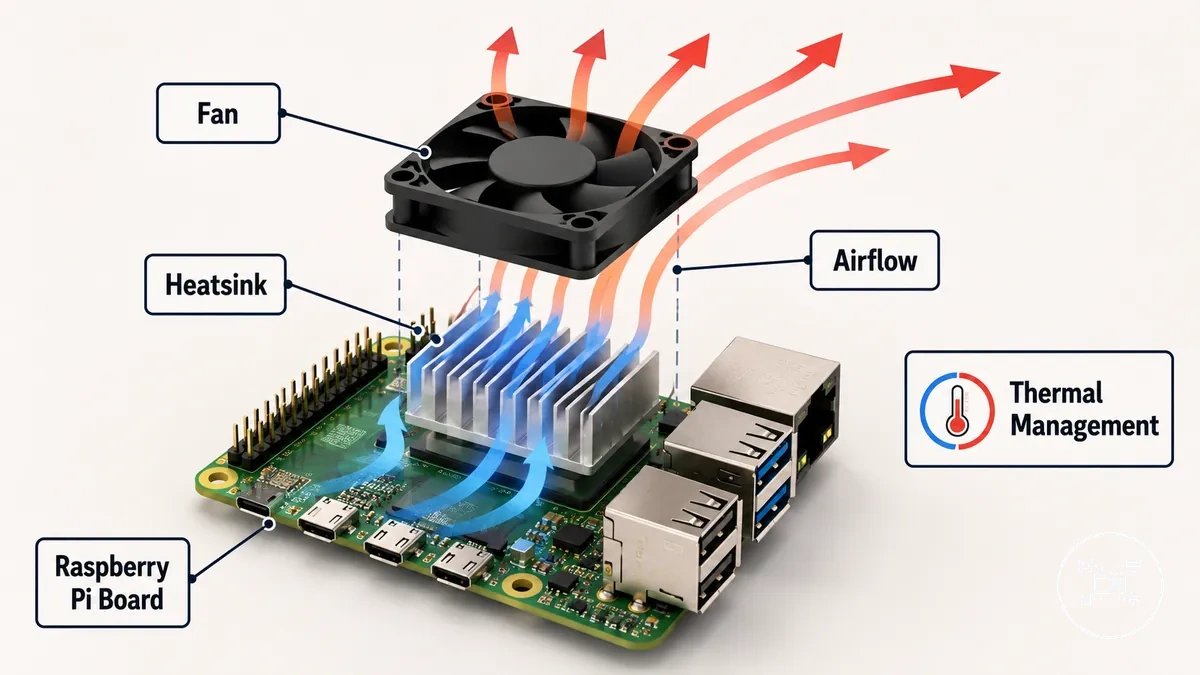
The illustration below identifies the heatsink, fan and airflow path as physical parts of Raspberry Pi cooling accessories.
The illustration below identifies the heatsink, fan and airflow path as physical parts of Raspberry Pi cooling accessories. Enclosures remain a separate accessory category, although cases with cooling fit can provide the clearance, mounting position or ventilation needed by a compatible cooling component.
Cooling Accessory Types and Thermal Performance Characteristics
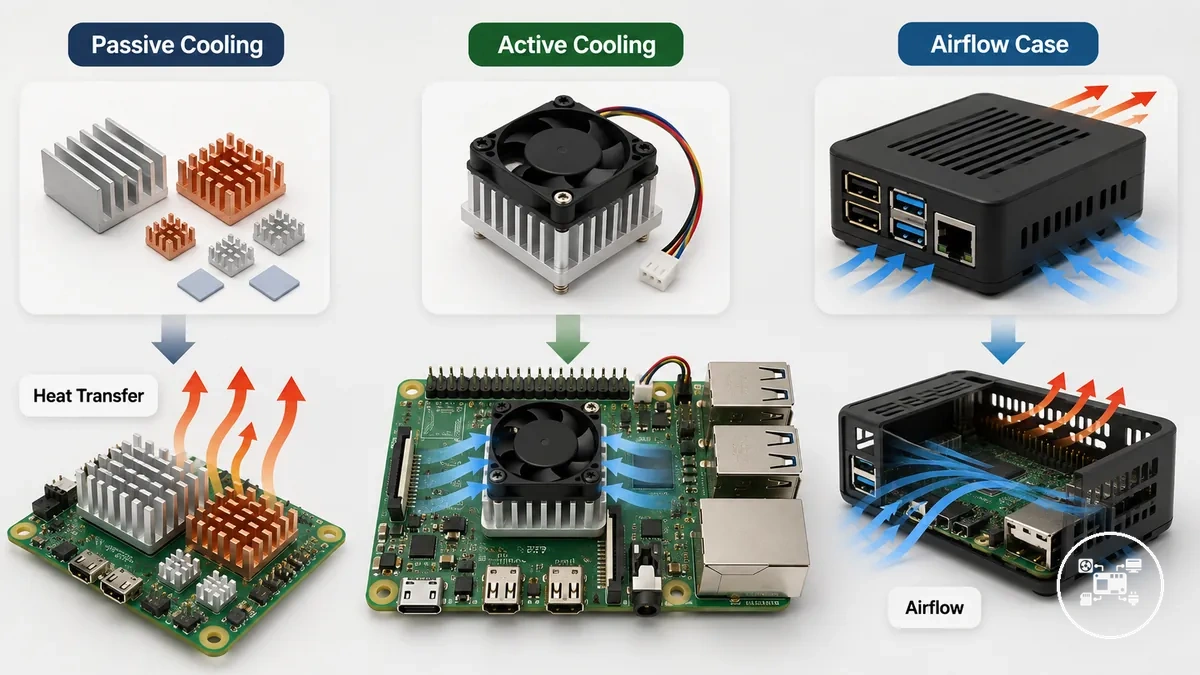
Cooling accessory types differ by their heat-transfer method, airflow generation, operating condition, and resulting thermal characteristics. The three primary categories are passive cooling, active cooling, and an airflow case. According to Raspberry Pi Ltd., passive cooling uses only a heatsink, while active cooling adds a fan to increase airflow across the heatsink and processor. The cooling effect of each category depends on the Raspberry Pi model, processor workload, enclosure ventilation, and ambient temperature rather than on a universally superior cooling method.
The three primary categories are passive cooling , active cooling , and an airflow case .
The comparison below highlights the main thermal attributes that distinguish each cooling approach and the situations where those attributes influence heat management decisions.
| Cooling accessory type | Primary thermal attribute | Operating condition | Thermal role and trade-off |
|---|---|---|---|
| Passive cooling (heatsink kit) | Heat transfer by conduction through an aluminium or copper heatsink followed by natural convection | No electrical power or moving components | Provides silent operation and lower maintenance, with heat dissipation limited by heatsink size, material, ambient temperature, and enclosure ventilation |
| Active cooling | Forced airflow from a fan increases convective heat transfer across the heatsink | Requires electrical power for fan operation | Improves sustained heat removal during continuous processor workloads but introduces fan noise, moving parts, and airflow dependency |
| Airflow case | Ventilation openings or integrated fans guide airflow through the enclosure | Requires unobstructed intake and exhaust paths | Reduces heat accumulation inside the enclosure and improves the effectiveness of compatible passive or active cooling accessories |
Material selection also affects thermal characteristics because copper conducts heat more efficiently than aluminium, while aluminium provides lower weight and cost for larger heatsink designs. For a model-specific example, Raspberry Pi Ltd. specifies that the Raspberry Pi 5 Official Active Cooler combines an anodised aluminium heatsink with a blower fan rated for a maximum airflow of 1.09 CFM and a maximum rotational speed of 8,000 RPM ±15%. Those specifications apply only to that official accessory and illustrate how airflow and heatsink design work together during sustained processor loads rather than defining universal cooling performance.
Passive Cooling, Active Cooling, and Airflow Solutions
Passive cooling, active cooling, and airflow solutions differ in their cooling method, operating characteristics, and suitable workload. Passive cooling uses only a heatsink to transfer heat through conduction and natural convection, while active cooling combines a heatsink with a fan to create forced airflow that removes heat more efficiently during sustained processor loads. Airflow solutions improve ventilation around the Raspberry Pi or within its enclosure to support either cooling method rather than replacing it. According to Raspberry Pi Ltd., the effectiveness of each approach depends on the Raspberry Pi model, enclosure design, ambient temperature, and workload instead of one method being universally superior.
| Cooling approach | Operating characteristics | Primary limitation | Suitable conditions |
|---|---|---|---|
| Passive cooling | Heatsink only with natural convection and no moving components | Heat dissipation is limited by heatsink surface area, enclosure ventilation, and ambient temperature | Short or intermittent CPU workloads where silent operation and low maintenance are priorities |
| Active cooling | Heatsink combined with a fan to generate forced airflow | Requires electrical power and introduces fan noise and moving parts | Continuous high CPU utilisation such as software compilation, media transcoding, server workloads, or AI processing |
| Airflow solution | Ventilated enclosure or case fan directs cool air across the board | Performance depends on unobstructed intake and exhaust paths | Improves the effectiveness of passive cooling or active cooling by reducing heat accumulation inside the enclosure |
Each cooling approach therefore supports a different operating condition rather than a fixed performance level. For example, Raspberry Pi Ltd. specifies that the Raspberry Pi 5 Official Active Cooler uses a blower fan with a maximum airflow of 1.09 CFM and a maximum rotational speed of 8,000 RPM ±15%, illustrating how active cooling increases convective heat transfer during sustained workloads. In contrast, passive cooling relies entirely on heatsink design and surrounding airflow, making enclosure ventilation a more significant factor in its thermal performance.
Raspberry Pi Cooling Selection Factors and Compatibility Considerations
Raspberry Pi cooling accessory selection should be based on compatibility between the Raspberry Pi model, the required cooling method, the enclosure, and the installed hardware rather than on the accessory name alone. According to Raspberry Pi Ltd., board layout, mounting points, connector placement, and thermal accessories differ between Raspberry Pi generations, so compatibility must be verified for the intended setup before installation. The most reliable selection outcome is achieved when the cooling requirement matches both the board's physical design and its expected operating conditions. :contentReference[oaicite:0]{index=0}
The checklist below separates the primary selection factors into measurable compatibility conditions so each criterion can be evaluated independently.
The checklist below separates the primary selection factors into measurable compatibility conditions so each criterion can be evaluated independently. The same evaluation process can also be applied through the Raspberry Pi accessories hub when combining cooling hardware with cases, HATs, storage, or other expansion accessories. :contentReference[oaicite:1]{index=1}
| Selection factor | Compatibility condition | Selection outcome |
|---|---|---|
| Raspberry Pi model | The cooling accessory must explicitly support the target Raspberry Pi generation and align with its processor location and mounting system. | Select only accessories that list the exact supported Raspberry Pi model. |
| Cooling requirement | The cooling method should correspond to the expected processor thermal demand and operating duration. | Match passive or active cooling to the intended sustained workload instead of assuming identical requirements across all boards. |
| Fan connector compatibility | According to Raspberry Pi Ltd., the Raspberry Pi 5 uses a dedicated 4-pin JST-SH PWM fan connector for compatible fan accessories. | Select a fan designed for that connector instead of relying on cable adapters. |
| Mechanical clearance | The heatsink, fan, enclosure, HAT, SSD adapter, and GPIO access must not physically interfere with one another. | Confirm vertical clearance and component spacing before assembling the setup. |
| Enclosure ventilation | Air intake and exhaust openings must remain unobstructed after installation. | Choose a setup that preserves unrestricted airflow through the enclosure. |
According to Raspberry Pi Ltd., Raspberry Pi processors begin thermal throttling at 80 °C and apply additional throttling at 85 °C, making these manufacturer-defined thresholds practical reference points when evaluating whether a cooling setup satisfies the intended operating condition. For example, if sustained CPU activity repeatedly reaches the 80 °C throttling threshold, selecting a compatible active cooling solution instead of relying solely on passive cooling can help maintain processor performance under the same workload. :contentReference[oaicite:2]{index=2}
Compatibility should also be verified across the complete hardware assembly rather than between only the Raspberry Pi board and the cooler.
Compatibility should also be verified across the complete hardware assembly rather than between only the Raspberry Pi board and the cooler. Raspberry Pi Ltd. specifies that the Raspberry Pi 5 M.2 HAT+ with 16 mm spacers is compatible with the Official Active Cooler, whereas the M.2 HAT+ Compact is not. This example demonstrates that a correct cooling selection depends on the combined fit of the Raspberry Pi model, accessory dimensions, connector layout, and enclosure configuration instead of a single compatibility claim. :contentReference[oaicite:3]{index=3}
Choosing Cooling Accessories for Different Raspberry Pi Workloads
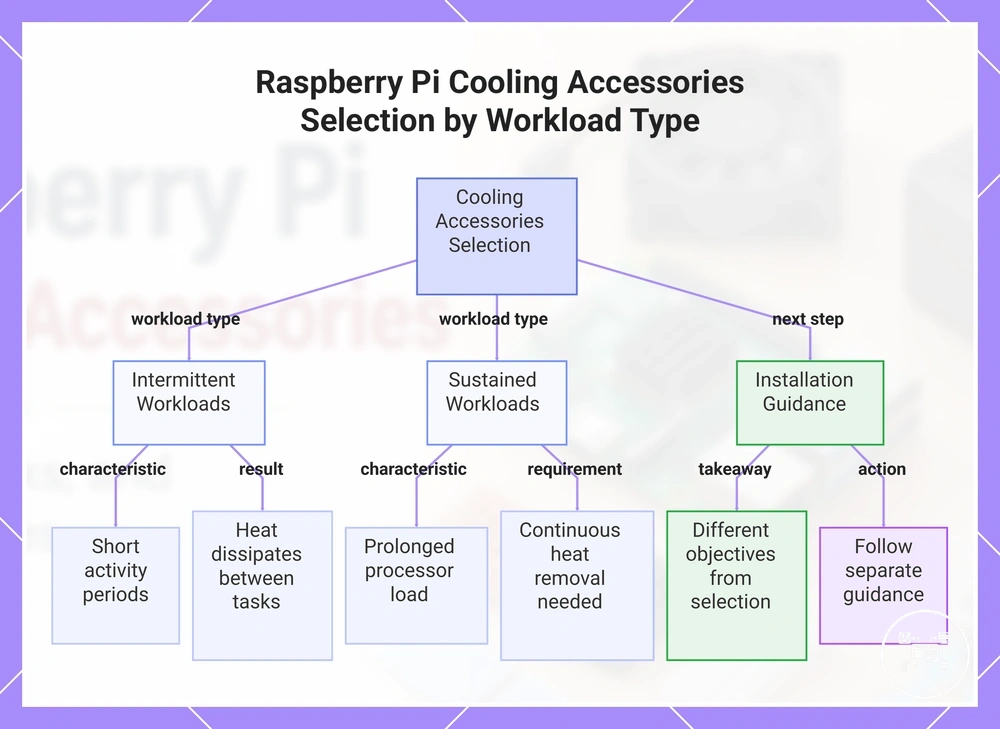
Raspberry Pi workload is the primary factor influencing a cooling choice because workload duration determines thermal demand. Intermittent activities such as coding, web browsing, or GPIO testing create short periods of processor activity that allow heat to dissipate between tasks, whereas sustained use—including software compilation, media transcoding, AI inference, or continuous server operation—keeps the processor under prolonged load and increases the need for continuous heat removal. Raspberry Pi Ltd. states that processor temperature and clock speed are managed automatically during operation, making workload duration a practical criterion when selecting cooling accessories rather than relying on a single accessory for every scenario. :contentReference[oaicite:0]{index=0}
Different workload patterns therefore create different thermal demands.
Different workload patterns therefore create different thermal demands. For example, independent testing by Tim Downey measured a Raspberry Pi 4 running a four-thread sysbench CPU workload at a 2.0 GHz overclock and recorded a benchmark time of approximately 216 seconds without cooling, while adding a 30 mm fan reduced the benchmark time to about 178.6 seconds and limited the observed processor temperature to approximately 64 °C under the same test conditions. This model-specific example illustrates that active airflow can improve sustained performance during continuous processor-intensive workloads, but it should not be interpreted as a universal outcome for every Raspberry Pi model or enclosure configuration. :contentReference[oaicite:1]{index=1}
Workload conditions should therefore be matched to cooling characteristics rather than treated as fixed project categories.
Workload conditions should therefore be matched to cooling characteristics rather than treated as fixed project categories. Continuous services such as a NAS, automation hub, or other home server cooling accessories scenarios generally justify evaluating sustained operating conditions before selecting passive or active cooling, while short-duration tasks often place less continuous thermal demand on the processor. After selecting the appropriate cooling method, follow separate guidance to install cooling accessories correctly, because installation quality and cooling selection are different decisions with different objectives. :contentReference[oaicite:2]{index=2}
This chart shows how workload duration determines cooling needs for Raspberry Pi, contrasting intermittent and sustained workloads, and notes that installation guidance is separate.
This chart shows how workload duration determines cooling needs for Raspberry Pi, contrasting intermittent and sustained workloads, and notes that installation guidance is separate.
Raspberry Pi Cooling Performance Limits and Overheating Considerations
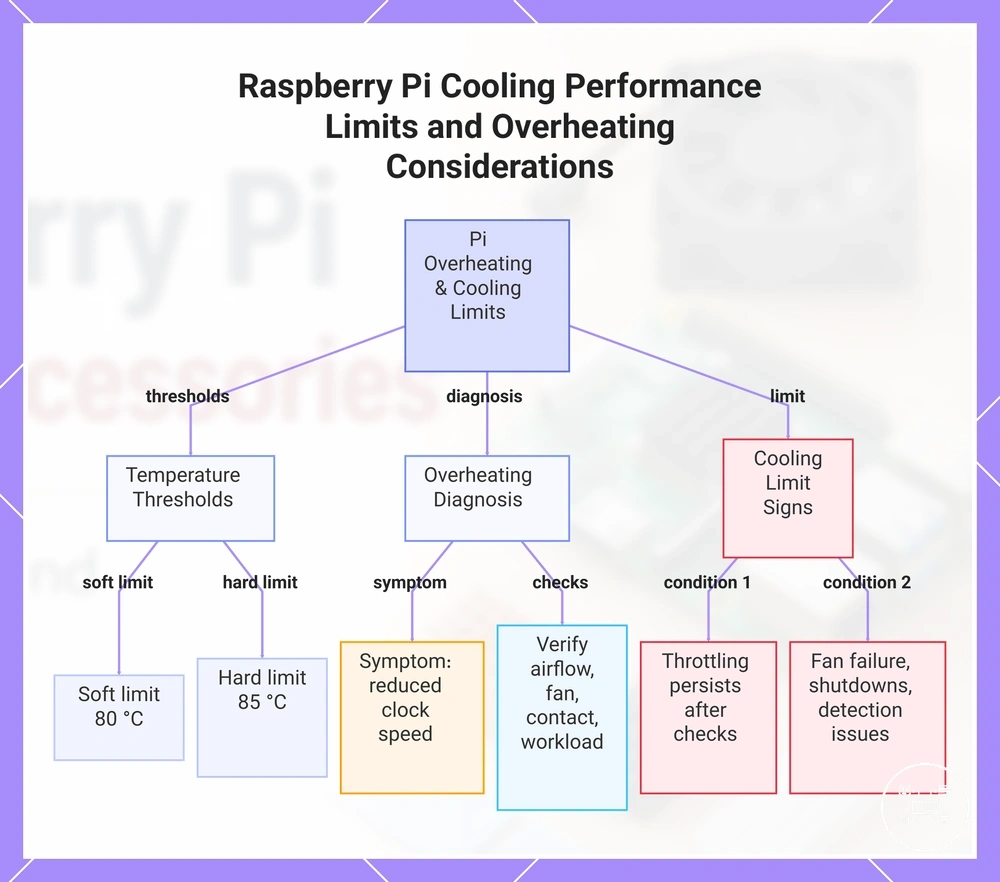
Raspberry Pi overheating is a thermal issue in which sustained processor heat causes the system to reduce clock speed, but a cooling accessory cannot eliminate every possible cause. Raspberry Pi Ltd. documents a soft temperature limit of 80 °C and a hard limit of 85 °C, with progressively stronger performance controls applied as processor temperature reaches those limits. A cooler therefore reduces heat accumulation under a demanding workload; it does not guarantee unrestricted performance in every enclosure, ambient temperature, or installation condition. :contentReference[oaicite:0]{index=0}
An overheating symptom such as reduced clock speed during sustained use should first be matched to its operating condition .
An overheating symptom such as reduced clock speed during sustained use should first be matched to its operating condition. A continuous processor-intensive workload, restricted case airflow, elevated ambient temperature, an obstructed fan, or poor contact between the processor and heatsink can each increase thermal stress; the appropriate response is to verify airflow, fan operation, heatsink contact, and workload behaviour before replacing the accessory. For example, when processor temperature repeatedly approaches the documented 80 °C control point during the same task, improved ventilation or correctly installed active cooling is a relevant mitigation, whereas persistent throttling after those checks indicates that cooling capacity or another setup factor remains unresolved. :contentReference[oaicite:1]{index=1}
Those conditions require broader diagnosis rather than another general cooling recommendation.
A cooling accessory reaches its practical limit when it is correctly installed and unobstructed but the Raspberry Pi still throttles during the intended workload, or when the symptom includes fan failure, power instability, unexpected shutdowns, or hardware-detection problems that cooling alone does not address. Those conditions require broader diagnosis rather than another general cooling recommendation. Use the dedicated guidance for overheating and accessory issues when the problem extends beyond temperature control, airflow, or cooler installation. :contentReference[oaicite:2]{index=2}
This chart shows the thermal thresholds, diagnostic steps, and cooling limit signs for Raspberry Pi overheating situations.
This chart shows the thermal thresholds, diagnostic steps, and cooling limit signs for Raspberry Pi overheating situations.