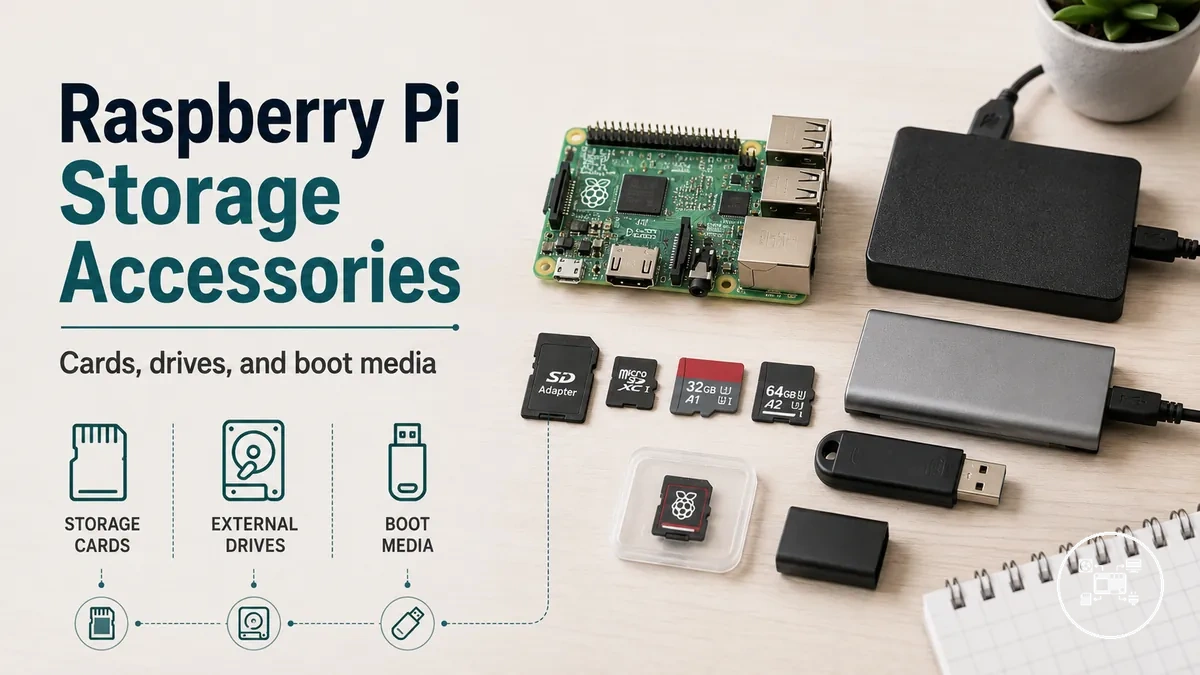
Raspberry Pi Storage Accessories: Cards, Drives, and Boot Media
Raspberry Pi storage accessories are the storage devices used to hold the operating system, applications, and user data while providing the boot media for the board. The primary storage categories are microSD cards, USB flash drives, USB solid-state drives (SSDs), and, on supported hardware, NVMe SSDs connected through a PCIe interface or compatible expansion board. According to Raspberry Pi Documentation, Raspberry Pi OS is normally installed on a microSD card, while Raspberry Pi 4, Raspberry Pi 400, Compute Module 4, and Raspberry Pi 5 also support USB boot, and Raspberry Pi 5 additionally supports PCIe-attached NVMe storage with appropriate hardware and firmware.
Storage selection should be based on four measurable criteria: storage medium, boot compatibility, capacity, and workload.
Storage selection should be based on four measurable criteria: storage medium, boot compatibility, capacity, and workload. According to Raspberry Pi Documentation, Raspberry Pi Imager supports operating system installation to both microSD cards and supported USB storage devices, while USB and NVMe boot availability depends on the Raspberry Pi model and firmware rather than being universal across every board revision. Storage capacities commonly range from 16 GB to 1 TB or more for consumer devices, but the Raspberry Pi Foundation does not prescribe a minimum capacity for every application because requirements differ by operating system, software, and data volume.
The larger storage capacity provides additional space for applications, databases, or media files without changing the software installation process.
For example, according to Raspberry Pi Documentation, a Raspberry Pi Zero 2 W can boot Raspberry Pi OS from a 32 GB microSD card for lightweight automation or educational projects, whereas a Raspberry Pi 5 equipped with a compatible PCIe M.2 HAT can boot from an NVMe SSD with capacities such as 256 GB or 512 GB when configured correctly. The larger storage capacity provides additional space for applications, databases, or media files without changing the software installation process.
This overview focuses on the storage decision itself rather than installation or performance tuning.
This overview focuses on the storage decision itself rather than installation or performance tuning. The most appropriate Raspberry Pi storage accessory depends on matching the board's supported boot methods and interfaces with the intended workload instead of selecting the largest or fastest storage device available.
Table of Contents
Raspberry Pi Storage Accessories and Storage Media Options
Raspberry Pi storage accessories are storage components that provide boot media, operating system storage, application storage, and persistent data storage for a Raspberry Pi system. As part of the Raspberry Pi accessories hub, they include microSD cards, USB flash drives, USB hard disk drives (HDDs), USB solid-state drives (SSDs), and, on supported models, PCIe-connected NVMe SSDs. According to Raspberry Pi Documentation, Raspberry Pi boards boot from removable or external storage depending on the board model, firmware, and configured boot order.
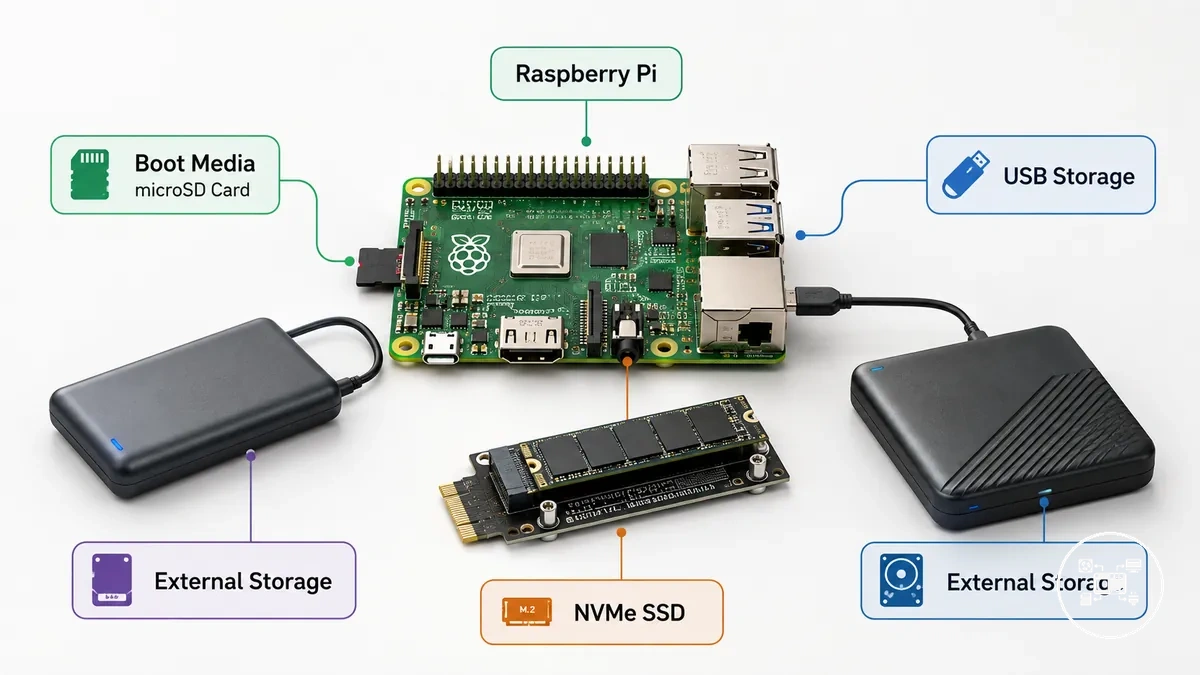
Boot media is the storage device that contains the bootloader, operating system, and required startup files. According to Raspberry Pi Documentation, Raspberry Pi OS can be written to a microSD card on all current Raspberry Pi boards, while Raspberry Pi 4, Raspberry Pi 400, Compute Module 4, and Raspberry Pi 5 also support USB boot after appropriate firmware support, and Raspberry Pi 5 supports NVMe SSD boot through its PCIe interface when compatible hardware is installed.
Boot media is the storage device that contains the bootloader, operating system, and required startup files.
Storage media for Raspberry Pi falls into three functional categories: removable boot media, removable data storage, and external high-capacity storage. MicroSD cards remain the standard removable boot medium, whereas USB flash drives, USB SSDs, USB HDDs, and PCIe NVMe SSDs primarily extend capacity or improve storage performance on supported models. According to Raspberry Pi Documentation, storage requirements depend on the operating system image, installed software, and data volume rather than on a single recommended device type.
Storage media for Raspberry Pi falls into three functional categories: removable boot media, removable data storage, and external high-capacity storage.
For example, Raspberry Pi Documentation recommends at least a 32 GB microSD card for Raspberry Pi OS with Desktop and at least an 8 GB card for Raspberry Pi OS Lite. A Raspberry Pi 5 configured with a compatible PCIe M.2 HAT and a 512 GB NVMe SSD provides substantially more application and data capacity than a 32 GB boot card while remaining within the same storage category of Raspberry Pi accessories.
Storage Types and Performance Attributes for Raspberry Pi
Raspberry Pi storage selection is primarily determined by five attributes: capacity, interface speed, endurance, reliability, and boot compatibility. According to Raspberry Pi Documentation, Raspberry Pi systems support booting from microSD cards on all current models, while Raspberry Pi 4, Raspberry Pi 400, Compute Module 4, and Raspberry Pi 5 also support USB mass-storage boot, and Raspberry Pi 5 additionally supports PCIe-connected NVMe SSD boot with compatible hardware. These attributes should be evaluated together because the most suitable storage type depends on both the Raspberry Pi model and the intended workload.
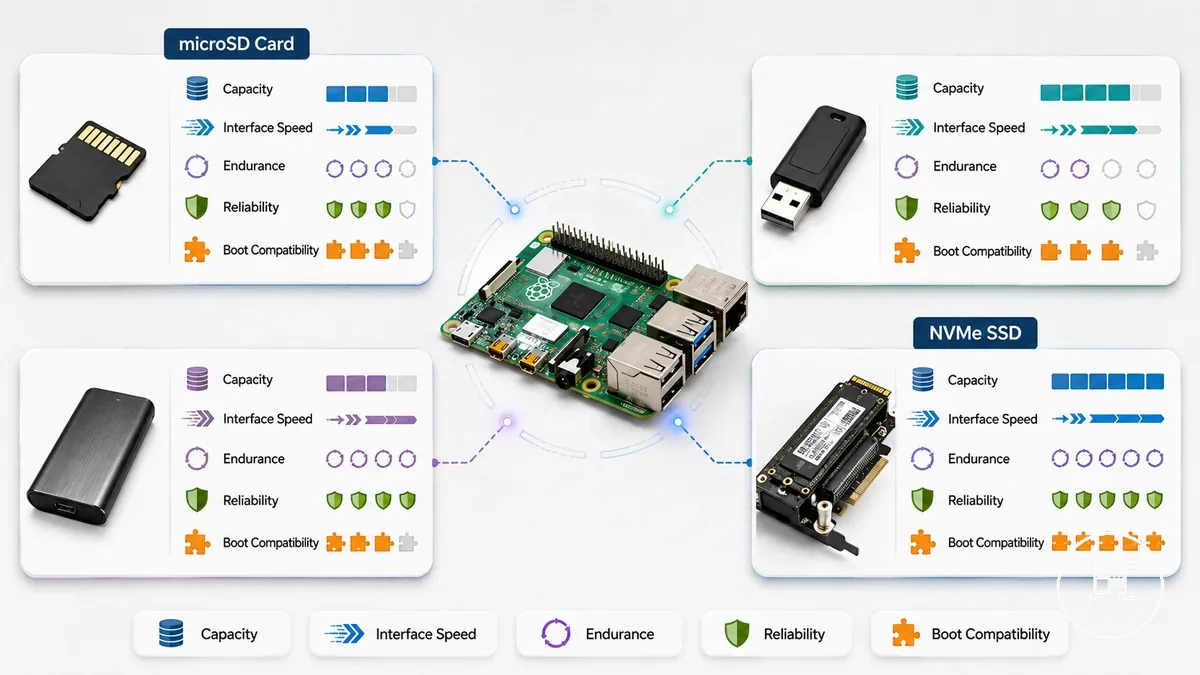
Capacity determines how much operating system, application, and user data can be stored, while interface speed influences boot time, application loading, and file transfers. According to Raspberry Pi Documentation, Raspberry Pi OS Lite requires at least 8 GB of storage, whereas Raspberry Pi OS with Desktop is recommended to use at least 32 GB. USB SSDs and PCIe NVMe SSDs generally provide faster storage access than microSD cards on supported Raspberry Pi models because they use higher-bandwidth interfaces.
The following comparison summarizes the major decision criteria for common Raspberry Pi storage types.
The following comparison summarizes the major decision criteria for common Raspberry Pi storage types.
| Storage Type | Capacity | Primary Attribute | Typical Decision |
|---|---|---|---|
| microSD Card | Commonly 8 GB to 1 TB | Universal boot compatibility and removable storage | General-purpose Raspberry Pi operating system installation |
| USB Flash Drive | Commonly 16 GB to 512 GB | Portable removable storage | Portable files and light USB boot workloads on supported models |
| USB SSD | Commonly 120 GB to 4 TB | Higher sustained throughput and improved write endurance | Desktop computing, databases, containers, and home servers |
| USB HDD | Commonly 500 GB to 20 TB | Large storage capacity | Media libraries, backups, and archival storage |
| NVMe SSD | Commonly 250 GB to 4 TB | PCIe-based high-performance storage on supported hardware | Performance-focused Raspberry Pi 5 deployments |
Endurance describes how well storage tolerates repeated write operations, while reliability reflects consistent long-term operation under normal conditions. According to Raspberry Pi Documentation, high-quality storage media are recommended for improved system stability, and manufacturers such as Kingston Technology specify that SSDs are better suited than standard consumer microSD cards for write-intensive workloads because they are designed for substantially higher write endurance.
The practical improvement depends on the Raspberry Pi model, storage interface, controller, and workload rather than a single guaranteed speed increase.
For example, according to Raspberry Pi Documentation, a Raspberry Pi running Raspberry Pi OS with Desktop can begin with a recommended 32 GB microSD card, while a Raspberry Pi 5 equipped with a compatible PCIe M.2 expansion board and a 512 GB NVMe SSD provides significantly more application space and storage performance for databases, containers, or media servers. The practical improvement depends on the Raspberry Pi model, storage interface, controller, and workload rather than a single guaranteed speed increase.
microSD Cards, USB Storage Drives, and SSD-Based Storage
microSD cards, USB storage drives, and SSD-based storage are the three primary local storage categories for Raspberry Pi, and they differ by connection interface, boot support, storage performance, and workload suitability rather than by a universally superior option. According to Raspberry Pi Documentation, all current Raspberry Pi models boot from microSD cards, Raspberry Pi 4, Raspberry Pi 400, Compute Module 4, and Raspberry Pi 5 also support USB mass-storage boot, and Raspberry Pi 5 supports PCIe-connected NVMe SSD boot when compatible hardware is installed.
microSD cards use the integrated microSD interface and provide removable boot media with capacities commonly available from 8 GB to 1 TB.
microSD cards use the integrated microSD interface and provide removable boot media with capacities commonly available from 8 GB to 1 TB. According to Raspberry Pi Documentation, Raspberry Pi OS Lite requires at least 8 GB of storage, while Raspberry Pi OS with Desktop is recommended to use at least 32 GB. This makes microSD cards appropriate for education, embedded systems, robotics, and portable Raspberry Pi projects where compact removable storage is sufficient.
USB storage drives include USB flash drives and USB SSDs connected through USB 2.0 or USB 3.0 ports, depending on the Raspberry Pi model.
USB storage drives include USB flash drives and USB SSDs connected through USB 2.0 or USB 3.0 ports, depending on the Raspberry Pi model. According to Raspberry Pi Documentation, supported Raspberry Pi models can boot directly from USB storage, while USB SSDs generally provide faster sustained read and write performance and greater write endurance than standard consumer microSD cards because they use dedicated SSD controllers and higher-bandwidth interfaces.
SSD-based storage includes USB SSDs and PCIe-connected NVMe SSDs.
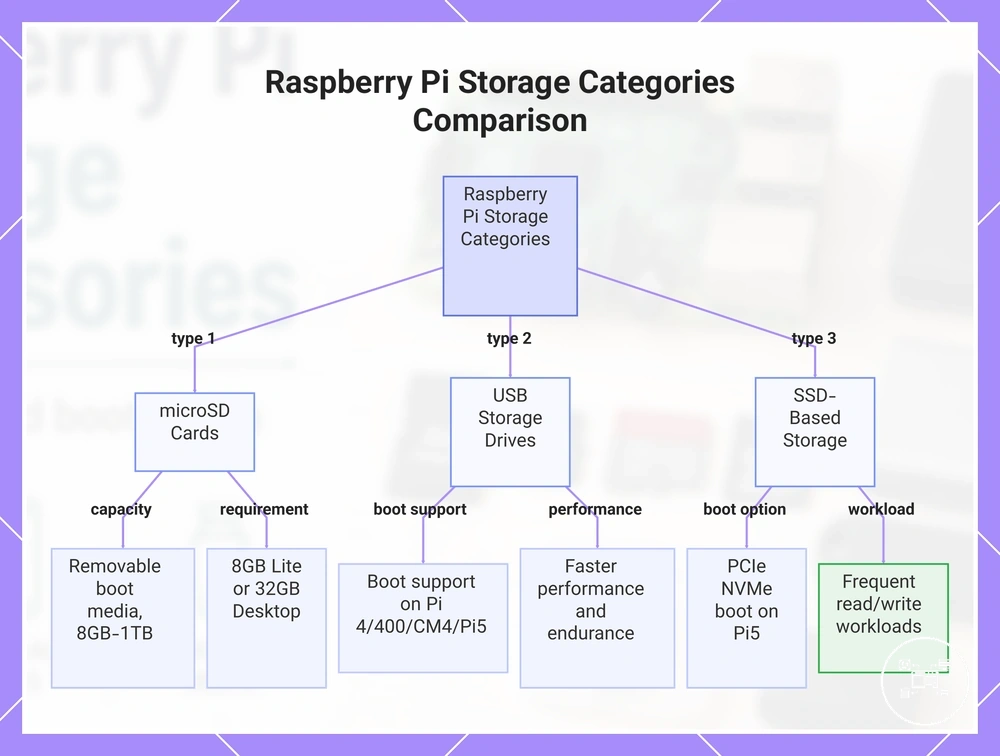
SSD-based storage includes USB SSDs and PCIe-connected NVMe SSDs. For example, according to Raspberry Pi Documentation, a Raspberry Pi 5 fitted with a compatible PCIe M.2 expansion board can boot from a 512 GB NVMe SSD, while a Raspberry Pi Zero 2 W commonly uses a 32 GB microSD card for Raspberry Pi OS. This comparison shows that microSD cards prioritise simplicity and broad compatibility, USB storage drives balance capacity and portability, and SSD-based storage is better suited to databases, containers, software development, and media servers that perform frequent read and write operations.
This chart compares the three primary local storage categories for Raspberry Pi: microSD cards, USB storage drives, and SSD-based storage, highlighting their key attributes and use cases.
This chart compares the three primary local storage categories for Raspberry Pi: microSD cards, USB storage drives, and SSD-based storage, highlighting their key attributes and use cases.
Capacity, Speed, Endurance, and Reliability Factors
Raspberry Pi storage accessories should be evaluated by capacity, random-access speed, write endurance, reliability, and operating conditions. Capacity must exceed the operating system and retained-data requirement; speed should match the workload’s access pattern; endurance should have a published write-life rating; and reliability should be assessed for the intended power, temperature, and write-frequency conditions.
These values are model- and device-specific specifications rather than guaranteed results for third-party media or different workloads.
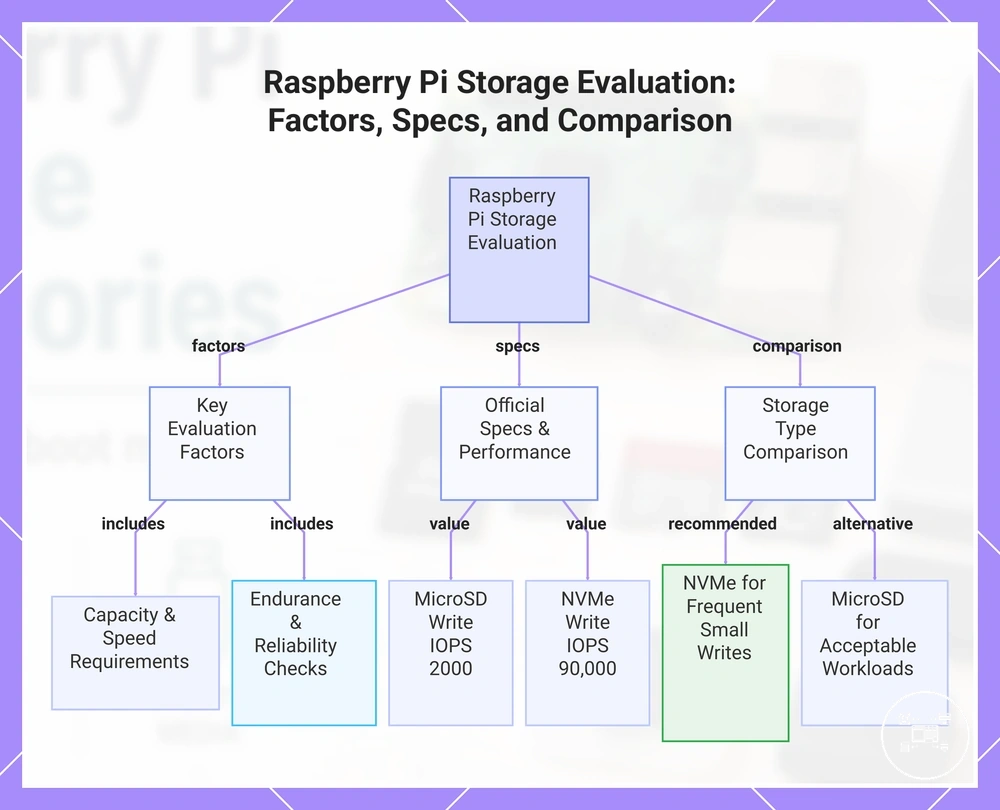
Raspberry Pi Documentation lists official microSD cards in 32 GB, 64 GB, and 128 GB capacities and official NVMe SSDs in 256 GB, 512 GB, and 1 TB capacities. The same documentation specifies 4 kB random performance of 3,200 read IOPS and 1,200 write IOPS for an official microSD card on Raspberry Pi 4, 5,000 read IOPS and 2,000 write IOPS on Raspberry Pi 5, and 50,000 read IOPS and 90,000 write IOPS for the 512 GB official NVMe SSD. These values are model- and device-specific specifications rather than guaranteed results for third-party media or different workloads. :contentReference[oaicite:0]{index=0}
Raspberry Pi Documentation lists official microSD cards in 32 GB, 64 GB, and 128 GB capacities and official NVMe SSDs in 256 GB, 512 GB, and 1 TB capacities.
Endurance identifies the amount of writing a storage device is designed to sustain, while reliability describes whether the device continues operating consistently under its specified conditions. The reviewed Raspberry Pi documentation does not publish a terabytes-written value, power-loss-protection rating, or universal service-life figure for every supported storage category, so those attributes must be verified in the selected device manufacturer’s specification rather than inferred from capacity or interface speed.
Endurance identifies the amount of writing a storage device is designed to sustain, while reliability describes whether the device continues operating consistently under its specified conditions.
For example, Raspberry Pi Documentation specifies 2,000 random write IOPS for its microSD card on Raspberry Pi 5 and 90,000 random write IOPS for its 512 GB NVMe SSD using 4 kB data, a calculated difference of 88,000 IOPS under those stated conditions. This comparison supports evaluating NVMe storage for frequent small-write workloads, while a microSD card remains suitable when its capacity, documented performance, and unspecified endurance boundary are acceptable for the intended workload. :contentReference[oaicite:1]{index=1}
This chart shows the key factors for evaluating Raspberry Pi storage, official performance specs, and a comparison between microSD and NVMe for different workloads.
This chart shows the key factors for evaluating Raspberry Pi storage, official performance specs, and a comparison between microSD and NVMe for different workloads.
Raspberry Pi Storage Compatibility Requirements
Raspberry Pi storage compatibility requires the board model, storage interface, boot method, adapter, and power supply to support the same configuration. Raspberry Pi Documentation identifies microSD as the standard boot medium, while USB mass storage and PCIe-connected NVMe storage are conditional options available only on boards and bootloader configurations that support those interfaces. :contentReference[oaicite:0]{index=0}
USB flash drives, HDDs, and SSDs require USB mass-storage boot support and a compatible USB-to-storage controller.
USB flash drives, HDDs, and SSDs require USB mass-storage boot support and a compatible USB-to-storage controller. Raspberry Pi Documentation states that Raspberry Pi 2B revisions 1.2 and 1.3, Raspberry Pi 3A+, Raspberry Pi 3B, Compute Module 3, and Compute Module 3+ require USB host boot mode to be enabled before they can boot from USB storage; later EEPROM-based boards use a configured boot order instead. :contentReference[oaicite:1]{index=1}
NVMe storage requires a Raspberry Pi with an exposed PCIe interface and an adapter that matches the drive form factor and connector.
NVMe storage requires a Raspberry Pi with an exposed PCIe interface and an adapter that matches the drive form factor and connector. Raspberry Pi Documentation specifies that the Raspberry Pi M.2 HAT+ connects one M-key device to Raspberry Pi 5 through a single-lane PCIe 2.0 interface with a stated peak transfer rate of 500 MB/s, supports 2230 and 2242 devices, and supplies up to 3 A to the connected M.2 device; the Compact version supports 2230 devices only. :contentReference[oaicite:2]{index=2}
Power availability can prevent an otherwise compatible storage device from operating reliably.
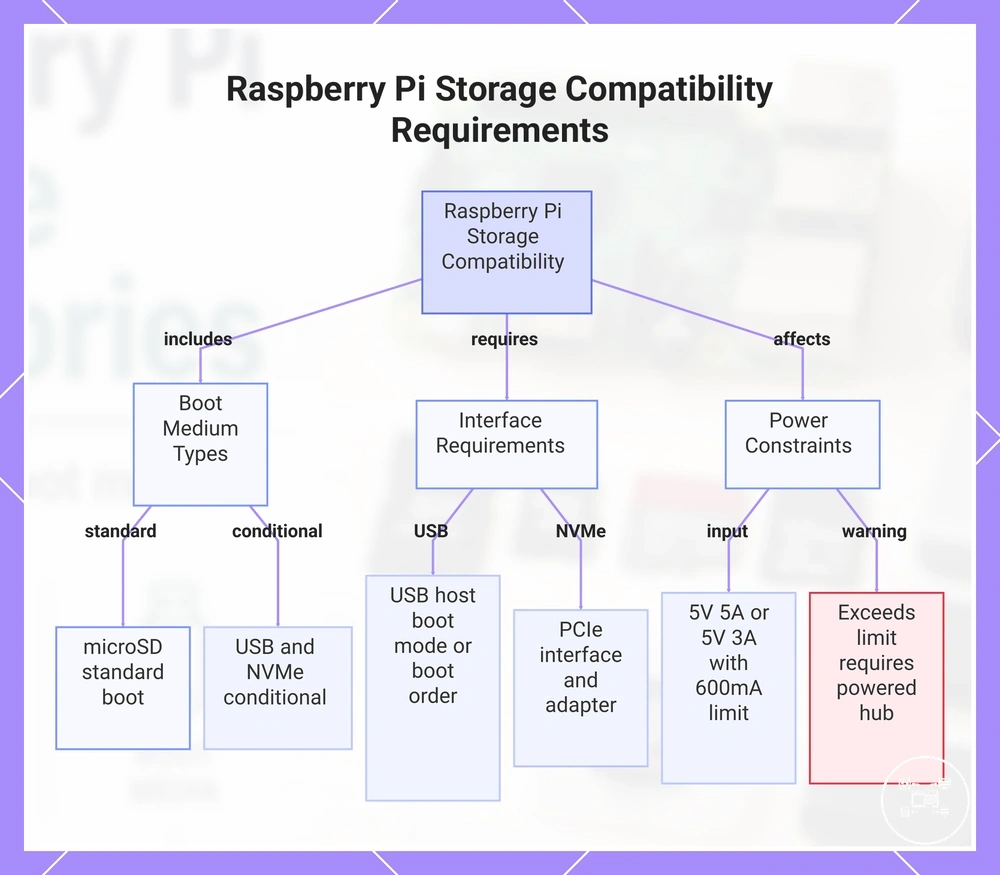
Power availability can prevent an otherwise compatible storage device from operating reliably. Raspberry Pi Documentation specifies Raspberry Pi 5 input power as 5 V at 5 A, or 5 V at 3 A with a 600 mA peripheral-current limit, so a drive whose combined USB power demand exceeds that limit requires an independently powered enclosure or powered USB hub. :contentReference[oaicite:3]{index=3}
A device should be treated as compatible only when every required interface and operating condition is satisfied, not merely because its connector can be physically attached.
Before selecting an accessory, verify the board model, connector type, supported boot mode, drive form factor, adapter specification, and power requirement against the detailed storage compatibility criteria. A device should be treated as compatible only when every required interface and operating condition is satisfied, not merely because its connector can be physically attached.
This chart shows the main storage compatibility requirements for Raspberry Pi boards, including boot medium types, interface conditions, and power constraints.
This chart shows the main storage compatibility requirements for Raspberry Pi boards, including boot medium types, interface conditions, and power constraints.
Choosing Between SD Cards and SSD Storage for Raspberry Pi
Choose a microSD card when removable storage, direct use of the board’s card slot, and straightforward operating-system imaging are the main priorities; choose SSD storage when the workload requires more capacity, substantially higher random I/O, or sustained read-and-write activity. The decision should be based on performance needs, published endurance, expected data volume, supported interfaces, and operating conditions rather than treating either option as universally preferable.
Raspberry Pi specifies its official microSD cards in 32 GB, 64 GB, and 128 GB capacities and its official NVMe SSDs in 256 GB, 512 GB, and 1 TB capacities.
Raspberry Pi specifies its official microSD cards in 32 GB, 64 GB, and 128 GB capacities and its official NVMe SSDs in 256 GB, 512 GB, and 1 TB capacities. Capacity should exceed the combined space required for the operating system, applications, updates, logs, and retained files, while endurance should be verified through the selected device manufacturer’s published write-life specification because Raspberry Pi does not publish one universal service-life value for all SD cards and SSDs.
The comparison below links each storage option to the conditions that affect a Raspberry Pi storage decision.
The comparison below links each storage option to the conditions that affect a Raspberry Pi storage decision.
| Decision Criterion | microSD Card | SSD Storage |
|---|---|---|
| Connection | Uses the integrated SD or microSD slot without an external storage adapter | Uses a supported USB connection or, on Raspberry Pi 5, a compatible PCIe M.2 adapter |
| Official Capacity Options | 32 GB, 64 GB, or 128 GB | 256 GB, 512 GB, or 1 TB for official Raspberry Pi NVMe SSDs |
| Random I/O Example | Raspberry Pi specifies 5,000 read IOPS and 2,000 write IOPS for its official card on Raspberry Pi 5 using 4 kB random data | Raspberry Pi specifies 50,000 read IOPS and 90,000 write IOPS for its official 512 GB NVMe SSD using 4 kB random data |
| Endurance Criterion | Suitable when the card’s published write-life rating covers the expected logging and update volume | Suitable for sustained-write workloads when the SSD’s manufacturer-stated endurance covers databases, containers, logs, or caches |
| Operating Conditions | Requires stable power, suitable media quality, and a workload within the card’s documented limits | Requires stable power, a supported controller or M.2 adapter, verified board support, and cooling where the device specification requires it |
Raspberry Pi’s official specifications make the 512 GB NVMe SSD’s 90,000 random write IOPS 45 times the official Raspberry Pi 5 microSD card value of 2,000 write IOPS under the same 4 kB data condition. This model-specific comparison supports SSD storage for databases, containers, frequent logging, and storage accessories for home server use, but it does not predict the performance of third-party drives, adapters, or different workloads.
Raspberry Pi’s official specifications make the 512 GB NVMe SSD’s 90,000 random write IOPS 45 times the official Raspberry Pi 5 microSD card value of 2,000 write IOPS under the same 4 kB data condition.
A microSD card remains appropriate for lightweight systems, portable projects, and storage accessories for media playback when the workload is dominated by sequential reading and fits within the card’s capacity and endurance limits. SSD storage becomes the more suitable category when persistent data exceeds available card capacity or when frequent small-file access and repeated writes make the SSD’s documented performance and endurance relevant.
Raspberry Pi Boot Media and External Storage Connections
Raspberry Pi boot media contains the operating-system image used to start the computer, while an external storage connection provides either a supported alternative boot path or additional storage after startup. Raspberry Pi Documentation identifies microSD as the most common boot medium and states that newer models can also boot from USB mass storage, network storage, or PCIe-connected NVMe storage when the board and bootloader configuration support that method.
A microSD card operates as boot media when the Raspberry Pi firmware reads its startup files and loads the installed operating system.
A microSD card operates as boot media when the Raspberry Pi firmware reads its startup files and loads the installed operating system. The card can also hold applications and user data, but its boot role is distinct from a second drive that is mounted only after Raspberry Pi OS starts.
USB flash drives, HDDs, and SSDs connect through a Raspberry Pi USB port and can function as mounted data storage on supported file systems.
USB flash drives, HDDs, and SSDs connect through a Raspberry Pi USB port and can function as mounted data storage on supported file systems. Raspberry Pi Documentation states that an external hard disk, SSD, or USB stick must have its file system mounted before Raspberry Pi OS can access its files; using the same device as boot media also requires USB mass-storage boot support and a compatible boot configuration.
A drive that exceeds the applicable limit can disconnect or fail to start even when its USB interface is otherwise compatible.
External USB storage must remain within the board’s available peripheral-power limit or receive power from an enclosure or powered hub. Raspberry Pi Documentation specifies that Raspberry Pi 5 operating from a 5 V, 3 A supply limits peripheral current to 600 mA, whereas the supported 5 V, 5 A supply permits the board’s higher-power peripheral mode. A drive that exceeds the applicable limit can disconnect or fail to start even when its USB interface is otherwise compatible.
PCIe expansion provides a separate connection path for NVMe storage on compatible Raspberry Pi hardware.
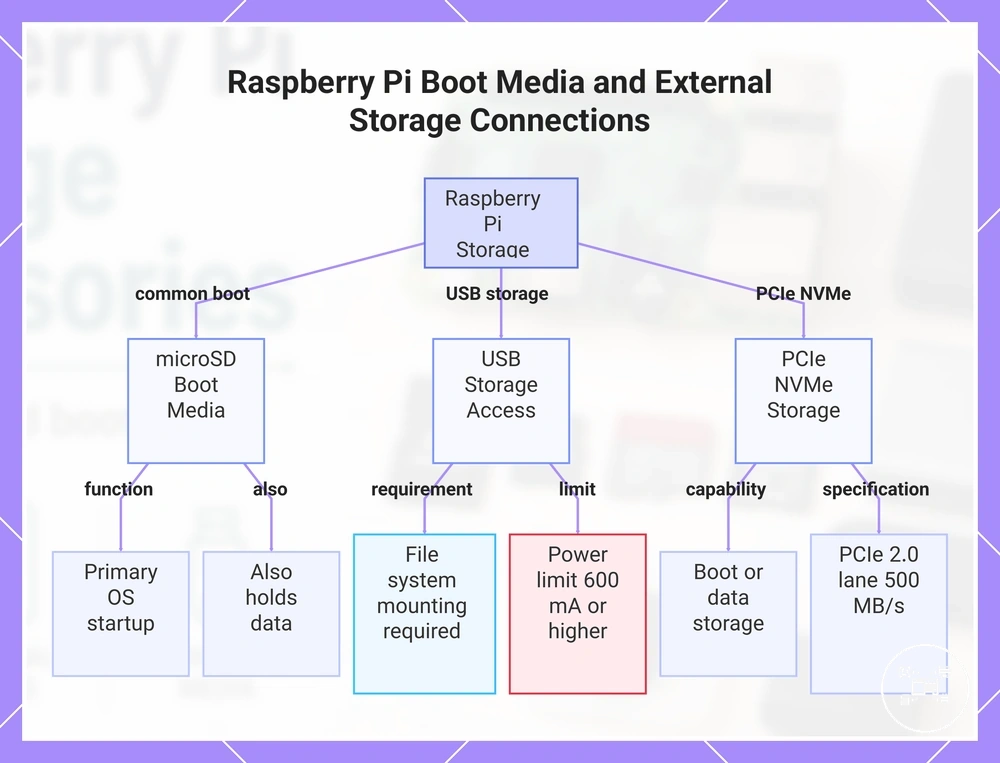
PCIe expansion provides a separate connection path for NVMe storage on compatible Raspberry Pi hardware. Raspberry Pi Documentation specifies that the Raspberry Pi M.2 HAT+ connects one M-key M.2 device to the Raspberry Pi 5 PCIe interface through a single PCIe 2.0 lane with a stated peak transfer rate of 500 MB/s; the NVMe device can serve as mounted data storage or as boot media when NVMe boot is enabled and selected by the bootloader.
For example, a Raspberry Pi 5 can start from a microSD card while using an attached NVMe SSD as secondary storage, or it can start directly from that NVMe SSD after the supported boot path is configured.
For example, a Raspberry Pi 5 can start from a microSD card while using an attached NVMe SSD as secondary storage, or it can start directly from that NVMe SSD after the supported boot path is configured. Imaging, mounting, boot-order changes, and connection procedures belong under setting up storage accessories; the functional distinction is whether the device starts the system or becomes available after startup.
This chart shows the main storage types for Raspberry Pi, including boot media (microSD) and external storage (USB, PCIe NVMe) with their key requirements and capabilities.
This chart shows the main storage types for Raspberry Pi, including boot media (microSD) and external storage (USB, PCIe NVMe) with their key requirements and capabilities.
M.2 Adapters and SSD Expansion Options
M.2 adapters expand Raspberry Pi storage by connecting an SSD through either the Raspberry Pi 5 PCIe interface or a supported USB mass-storage path. Raspberry Pi Documentation specifies that the official M.2 HAT+ exposes one M-key M.2 connection over a single PCIe 2.0 lane, while a USB-to-M.2 enclosure presents the installed SSD through the enclosure’s USB controller and therefore requires matching SSD protocol, connector key, board support, and power conditions.
The comparison below clarifies the interface, supported drive format, and compatibility boundary for each expansion path.
The comparison below clarifies the interface, supported drive format, and compatibility boundary for each expansion path.
| Expansion Option | Interface | Supported SSD Condition | Compatibility Boundary |
|---|---|---|---|
| Raspberry Pi M.2 HAT+ Standard | Single-lane PCIe 2.0 with a stated peak transfer rate of 500 MB/s | M-key M.2 devices in 2230 or 2242 form factors | Requires Raspberry Pi 5, its exposed PCIe connector, and a compatible PCIe or NVMe device |
| Raspberry Pi M.2 HAT+ Compact | Single-lane PCIe 2.0 with a stated peak transfer rate of 500 MB/s | M-key M.2 devices in the 2230 form factor | Does not accept 2242 devices because its physical mounting position is limited to 2230 length |
| USB-to-M.2 Adapter or Enclosure | USB mass-storage connection through the adapter’s controller | The enclosure must support the installed SSD protocol, such as NVMe or SATA, as well as its key and form factor | Operation is limited by the Raspberry Pi model, USB interface, controller compatibility, boot configuration, and available power |
According to Raspberry Pi Documentation, both official M.2 HAT+ variants can supply up to 3 A to one connected M.2 device. The Standard version accepts 2230 and 2242 devices, whereas the Compact version accepts 2230 devices only, so physical length and mounting position determine whether an otherwise compatible M-key SSD can be installed.
According to Raspberry Pi Documentation, both official M.2 HAT+ variants can supply up to 3 A to one connected M.2 device.
For example, Raspberry Pi specifies its 512 GB NVMe SSD in the 2230 form factor with 50,000 random read IOPS and 90,000 random write IOPS using 4 kB data. That drive fits either official M.2 HAT+ variant, while a 2242 M-key NVMe SSD fits the Standard version but not the Compact version; actual transfer performance remains bounded by the Raspberry Pi 5 single-lane PCIe 2.0 connection and its stated 500 MB/s peak rate.