Raspberry Pi Cases: Protection, Compatibility, and Cooling Options
A Raspberry Pi case is a protective enclosure designed to house a Raspberry Pi board while maintaining access to its ports, connectors, and cooling features. Raspberry Pi cases should be evaluated using four primary criteria: compatibility with the specific Raspberry Pi model, physical protection, cooling capability, and clearance for connected accessories. According to Raspberry Pi Ltd., each Raspberry Pi generation has different board dimensions, connector layouts, and mounting-hole positions, so a case designed for one model should not be assumed to fit another model.
A Raspberry Pi case is a protective enclosure designed to house a Raspberry Pi board while maintaining access to its ports, connectors, and cooling features.
Raspberry Pi cases establish the operating environment for the board by protecting electronic components from accidental contact, dust, and minor mechanical impacts while allowing the hardware to function within its intended thermal conditions. Case compatibility is determined by the exact board model, installed HATs or expansion boards, heatsinks, active cooling hardware, storage devices, display cables, and other connected peripherals rather than by the Raspberry Pi brand alone. This article evaluates Raspberry Pi cases through those compatibility, protection, fit, and cooling relationships before discussing individual case characteristics.
Cooling performance depends on enclosure design rather than enclosure presence alone.
Cooling performance depends on enclosure design rather than enclosure presence alone. According to Raspberry Pi Ltd., the official Raspberry Pi 5 Active Cooler combines an aluminium heatsink with a temperature-controlled blower for Raspberry Pi 5, whereas passive cases rely on ventilation openings, thermally conductive materials, or integrated heatsinks to dissipate heat. For example, a Raspberry Pi 5 fitted with the official Active Cooler requires a case specifically designed to accommodate that cooler, while many compact Raspberry Pi 4 cases do not provide sufficient internal clearance, making board model and cooling hardware equally important compatibility criteria.
Table of Contents
Raspberry Pi Cases and Enclosures for Board Protection
A Raspberry Pi case or enclosure is a protective housing that contains a Raspberry Pi board while providing physical coverage, access to external connectors, and space for compatible cooling hardware. According to Raspberry Pi Ltd., official cases are engineered for specific Raspberry Pi models because board dimensions, connector locations, and mounting-hole layouts differ between generations. A Raspberry Pi case primarily protects the circuit board from accidental contact, light dust exposure, and minor mechanical impacts, but the degree of protection depends on the enclosure's material, structural design, and ventilation rather than on the presence of a case alone.
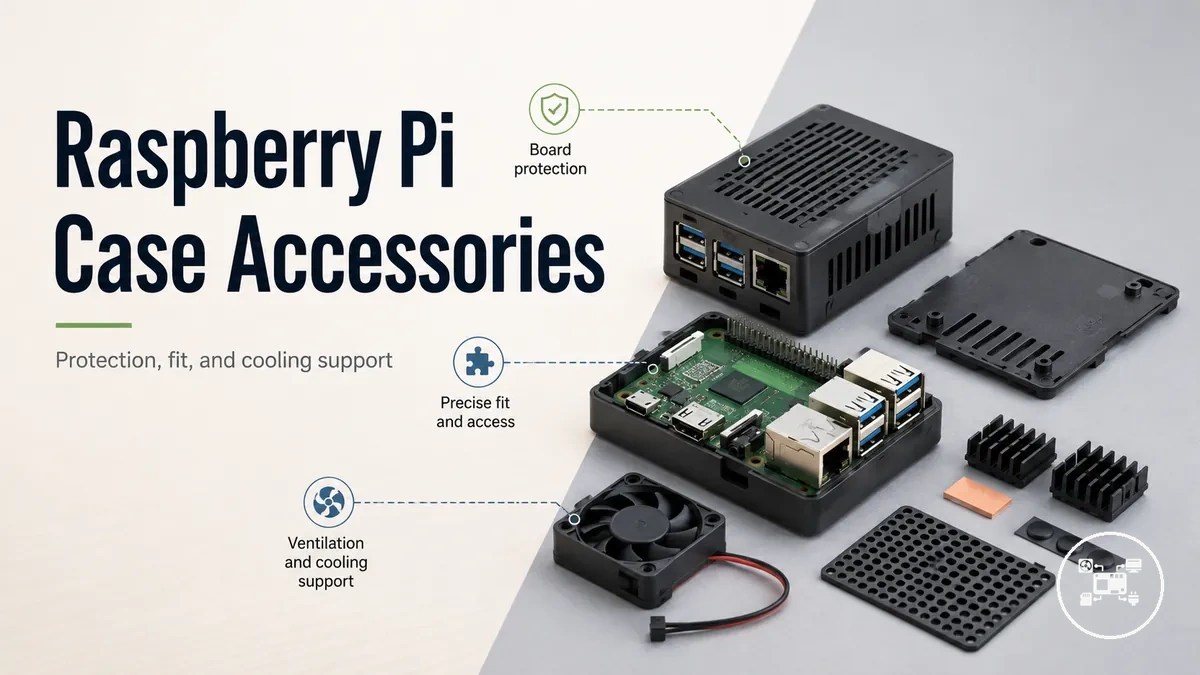
Raspberry Pi accessories are hardware additions that extend, power, cool, mount, or protect a Raspberry Pi system, and a Raspberry Pi case is the accessory specifically intended for board housing and physical protection. Before comparing materials or cooling designs, it is useful to recognise that enclosure construction determines how much of the board is covered, whether GPIO pins remain exposed, and whether heatsinks or active cooling can be installed. 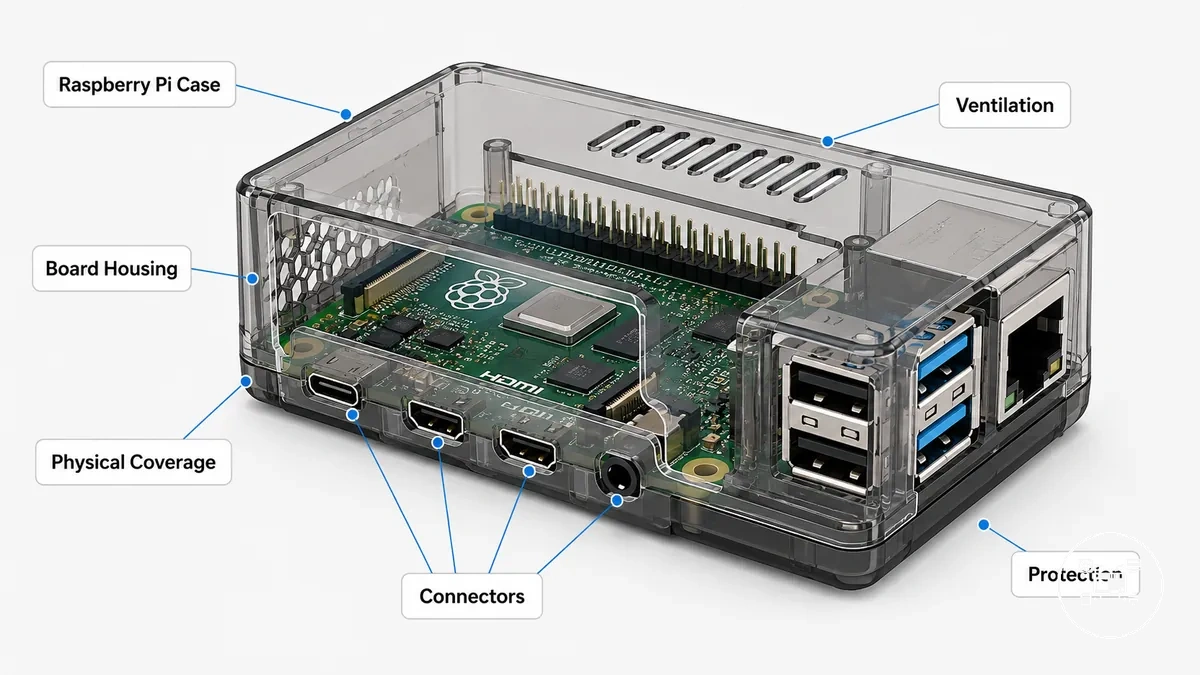 According to Raspberry Pi Ltd. and manufacturer specifications from PiShop US and SunFounder, enclosures are available in enclosed, ventilated, aluminium, acrylic, and fan-compatible designs, each providing different physical coverage and cooling accommodation. For example, the official Raspberry Pi 5 Case is designed specifically for the Raspberry Pi 5 board and supports the official Active Cooler, whereas a Raspberry Pi 4 enclosure does not provide the same internal layout or connector alignment for Raspberry Pi 5, demonstrating that protection depends on both enclosure design and the intended board model.
Raspberry Pi Case Types and Materials
Raspberry Pi case types are primarily classified by their enclosure material and structural design, and those attributes determine the balance between physical protection, accessibility, weight, and thermal management. According to Raspberry Pi Ltd., official cases are manufactured for specific Raspberry Pi board generations because board dimensions and connector layouts differ between models. The most common case materials are aluminium, acrylic, and moulded plastic, each supporting different operating conditions rather than representing a universally superior choice.
The main material differences become clearer when comparing how each enclosure supports everyday use.
The main material differences become clearer when comparing how each enclosure supports everyday use.
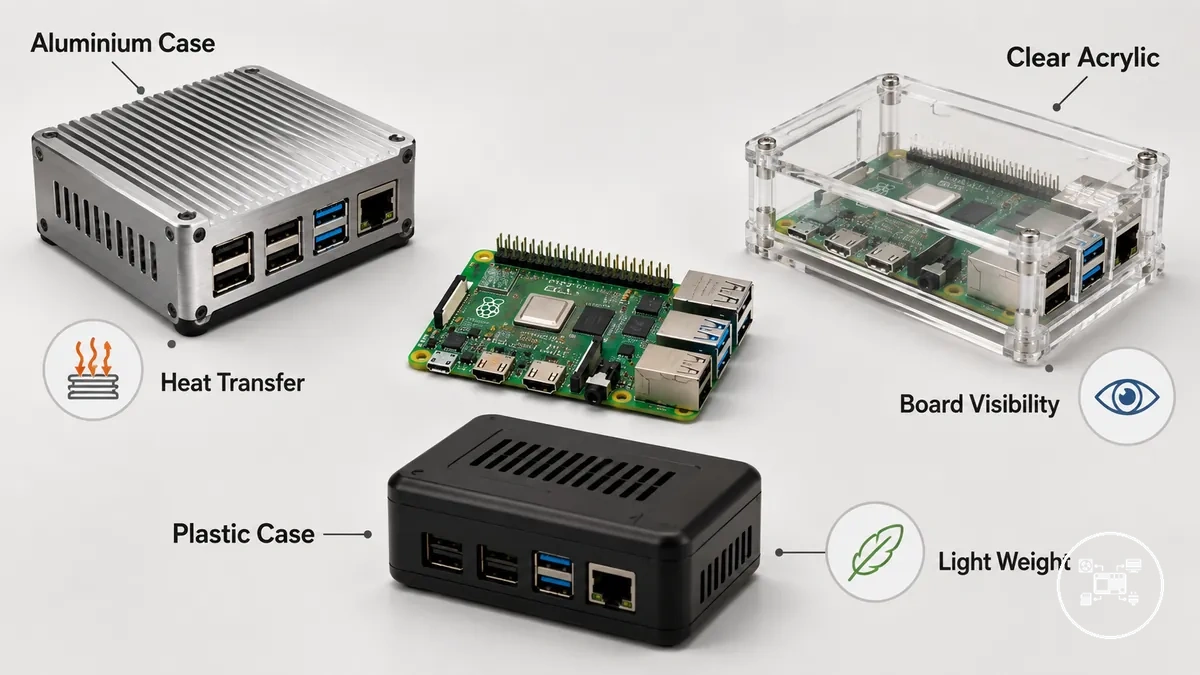
- Aluminum case: Aluminium provides high mechanical rigidity and high thermal conductivity, allowing many designs to transfer processor heat into the enclosure through thermal pads. According to Raspberry Pi Ltd. and recognised enclosure manufacturers, aluminium cases are commonly selected for continuous workloads where passive heat dissipation is beneficial, although they are typically heavier than plastic or acrylic alternatives.
- Clear case: Clear acrylic cases prioritise visibility by exposing the Raspberry Pi board, GPIO header, status LEDs, and internal components while still providing basic protection from accidental contact and dust. Their lower weight makes them well suited to educational projects, demonstrations, and prototype systems where frequent inspection is required.
- Protective case: Injection-moulded ABS or polycarbonate protective cases balance light weight, impact resistance, and easy access to external ports. According to Raspberry Pi Ltd., official plastic enclosures are engineered to match the connector positions and mounting points of their intended Raspberry Pi model, helping maintain straightforward installation without modifying the board.
Material selection influences practical operating conditions through measurable physical properties rather than marketing claims. For example, aluminium has a thermal conductivity of approximately 205 W/m·K, while acrylic is typically around 0.2 W/m·K, making aluminium substantially more effective at conducting heat away from components when the enclosure is designed as a heatsink. Those values, reported by standard engineering material references, explain why aluminium cases generally support passive cooling more effectively, whereas clear acrylic and protective plastic cases prioritise visibility, lower weight, and everyday handling instead of heat transfer.
Raspberry Pi Case Compatibility with Boards and Accessories
Raspberry Pi case compatibility depends on matching the enclosure to the correct Raspberry Pi board model and verifying that installed accessories fit within the case. According to Raspberry Pi Ltd., Raspberry Pi 5, Raspberry Pi 4 Model B, Raspberry Pi Zero series, and Compute Module products use different board dimensions, connector layouts, and mounting-hole positions, so a case manufactured for one family should not be assumed to fit another. Raspberry Pi case compatibility should therefore be confirmed using the board model, mechanical fit, and installed accessories before purchase or installation.
Raspberry Pi case compatibility should therefore be confirmed using the board model, mechanical fit, and installed accessories before purchase or installation.
Use these case compatibility checks to verify fit before selecting a Raspberry Pi case:
- Board model: Match the case to the exact Raspberry Pi model because PCB size, connector placement, and mounting-hole locations differ between board generations according to Raspberry Pi Ltd.
- Mounting alignment: Verify that all mounting holes align with the board so it can be secured without mechanical stress or modification.
- HAT clearance: Check the internal case height if a HAT, PoE HAT, GPIO expansion board, or other stacked accessory is installed. Low-profile enclosures often cannot close when full-height expansion boards are fitted.
- Cooling accessory fit: Confirm sufficient clearance for heatsinks, the Raspberry Pi 5 Active Cooler, fan assemblies, camera cables, SSD adapters, or display ribbon cables because these components can prevent the enclosure from closing.
- Port accessibility: Ensure the case openings align with every required interface, including USB, HDMI, Ethernet, GPIO, camera, display, power, and the microSD card where applicable.
Compatibility should be assessed for the complete hardware configuration rather than the board alone. For example, Raspberry Pi Ltd. specifies that the official Raspberry Pi 5 Active Cooler is designed exclusively for Raspberry Pi 5, so a Raspberry Pi 5 enclosure that accommodates the cooler requires greater internal clearance than many Raspberry Pi 4 cases provide. Likewise, a board that physically fits a case may still become incompatible if a full-height HAT or oversized heatsink exceeds the enclosure's available internal space, making accessory dimensions just as important as board compatibility.
Compatibility should be assessed for the complete hardware configuration rather than the board alone.
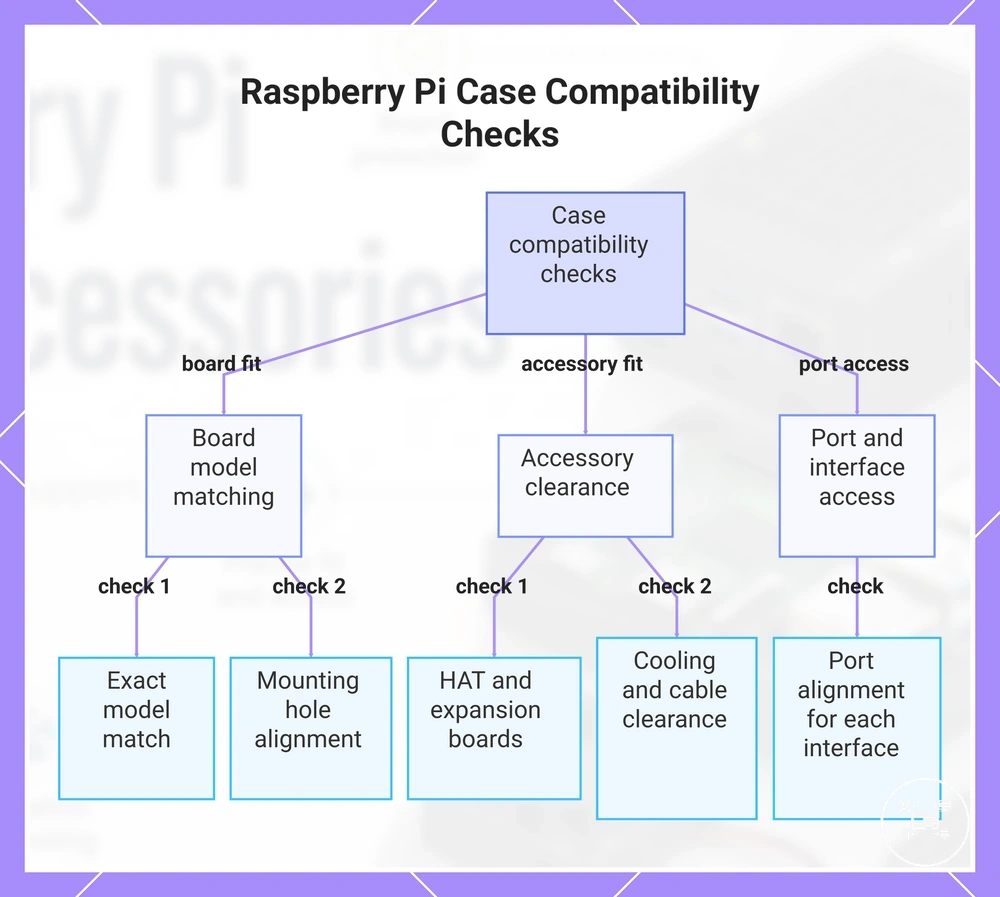
This chart shows the key checks for verifying Raspberry Pi case compatibility, including board model matching, accessory clearance, and port access.
Raspberry Pi Case Access, Ports, and Expansion Support
Raspberry Pi case access determines whether an enclosure allows or restricts physical use of the board's external ports, GPIO header, ribbon-cable connectors, and expansion hardware. According to Raspberry Pi Ltd., connector positions differ between Raspberry Pi generations, and Raspberry Pi 5 includes a 40-pin GPIO header, two micro-HDMI ports, four USB ports, Gigabit Ethernet, two four-lane MIPI connectors for camera or display modules, a PCIe FFC connector, and dedicated fan and RTC battery connectors. An enclosure should therefore match the intended board model and expose every interface required for the installed hardware rather than assuming universal access across all Raspberry Pi boards.
Raspberry Pi case access determines whether an enclosure allows or restricts physical use of the board's external ports, GPIO header, ribbon-cable connectors, and expansion hardware.
Use these cable access with cases checks to evaluate enclosure accessibility before installation:
- Port openings: Verify that cut-outs align with the board's USB, HDMI, Ethernet, power, audio, and microSD interfaces where applicable. Connector alignment is model-specific according to Raspberry Pi Ltd.
- GPIO access: Confirm that the enclosure leaves the 40-pin GPIO header accessible if jumper wires, breakout boards, or HATs will be connected. Raspberry Pi Ltd. specifies that the official Raspberry Pi 5 Case provides removable GPIO access while the board remains installed.
- HAT clearance: Check that the enclosure provides sufficient vertical space for expansion boards installed above the GPIO header. Low-profile lids restrict installation when the assembled HAT height exceeds the available internal clearance specified by the case manufacturer.
- Cable routing: Ensure dedicated openings or routing channels are available for MIPI camera cables, display ribbon cables, PCIe FFC cables, or fan wiring so cables are not sharply folded or trapped between enclosure panels.
- Expansion support: Confirm that installed heatsinks, active coolers, SSD adapters, and expansion boards do not obstruct port access or prevent the enclosure from closing after assembly.
For example, a Raspberry Pi 5 configured with one GPIO HAT and one MIPI camera cable requires simultaneous access to the 40-pin GPIO header and one of the board's two MIPI connectors specified by Raspberry Pi Ltd. If the enclosure provides external USB and HDMI openings but no removable GPIO section or cable-routing slot, the board remains operational for desktop use but expansion hardware cannot be installed without opening or replacing the case.
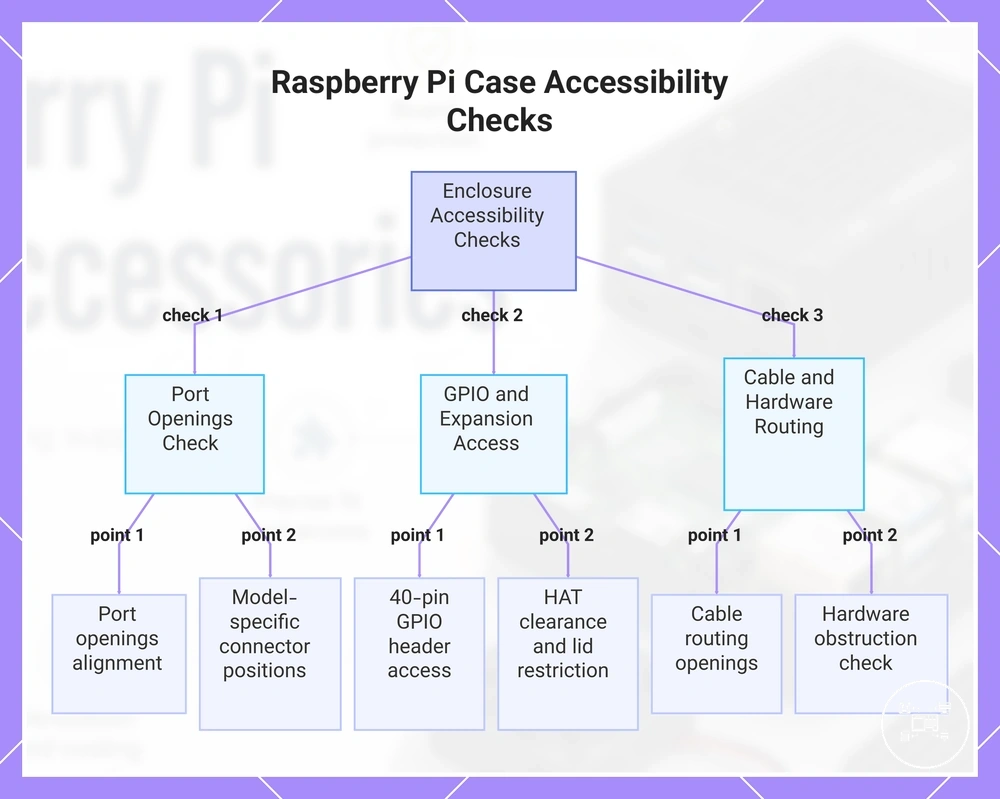
This chart shows the key checks to evaluate whether a Raspberry Pi enclosure provides proper access to ports, GPIO, expansion hardware, and cables before installation.
This chart shows the key checks to evaluate whether a Raspberry Pi enclosure provides proper access to ports, GPIO, expansion hardware, and cables before installation.
Cooling Features in Raspberry Pi Cases
Raspberry Pi case cooling supports thermal management through three enclosure-level features: ventilated airflow openings, passive heat dissipation using thermally conductive materials, and integrated active fan mounting. According to Raspberry Pi Ltd., the official Raspberry Pi 5 Case includes built-in airflow channels and is compatible with the Raspberry Pi Active Cooler, while other enclosure designs rely on ventilation slots or metal construction to assist heat removal. The cooling benefit therefore depends on the enclosure design, processor workload, ambient environment, and whether airflow paths remain unobstructed.
Different case designs manage heat in different ways.
Different case designs manage heat in different ways. Ventilated cases promote natural convection by allowing warm air to escape through openings, although they do not actively move air. Aluminum cases support passive cooling when thermal pads create direct contact between the processor and the enclosure, allowing heat to spread across the metal body. Fan-compatible cases provide active airflow by moving air through the enclosure, but their effectiveness depends on adequate intake and exhaust openings and sufficient internal clearance around the fan and heatsink. Raspberry Pi Ltd. specifies that the official Raspberry Pi Active Cooler combines an aluminum heatsink with a temperature-controlled blower specifically for Raspberry Pi 5.
Cooling performance should be matched to the expected operating conditions rather than the enclosure material alone.
Cooling performance should be matched to the expected operating conditions rather than the enclosure material alone. For example, a Raspberry Pi 5 continuously compiling software or processing video places a sustained load on all four CPU cores, making an enclosure with unobstructed airflow or official Active Cooler support more appropriate than a sealed enclosure designed only for physical protection. Readers comparing cooling accessories and case airflow should evaluate whether the enclosure provides ventilation, passive thermal contact, or integrated fan support before selecting additional cooling hardware.
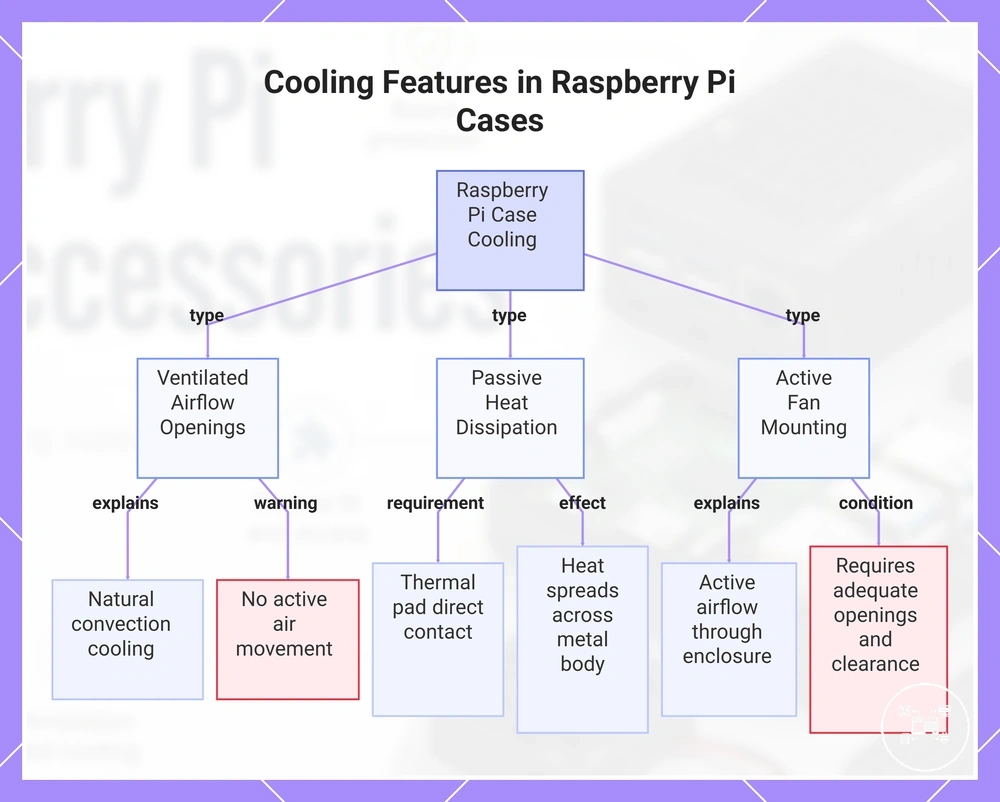
This chart shows the three main cooling features in Raspberry Pi cases: ventilated openings, passive heat dissipation, and active fan mounting, along with their mechanisms and requirements.
This chart shows the three main cooling features in Raspberry Pi cases: ventilated openings, passive heat dissipation, and active fan mounting, along with their mechanisms and requirements.
Choosing a Raspberry Pi Case for Different Setup Requirements
Raspberry Pi case selection should be based on four primary criteria: board compatibility, physical protection, connector accessibility, and cooling support. According to Raspberry Pi Ltd., official cases are designed for specific Raspberry Pi models because board dimensions, connector locations, and supported accessories differ between generations. The appropriate case therefore depends on the complete hardware configuration, including installed HATs, cooling hardware, storage devices, and the intended operating environment.
Raspberry Pi case selection should be based on four primary criteria: board compatibility, physical protection, connector accessibility, and cooling support.
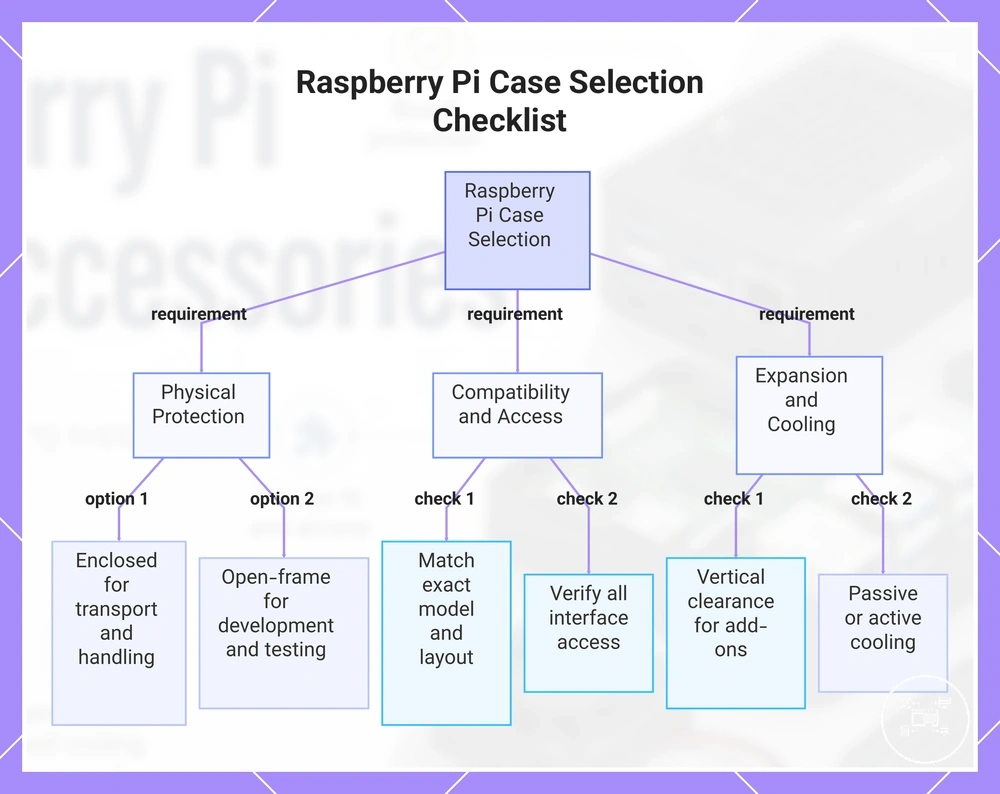
Use this checklist before installing case accessories to evaluate whether a Raspberry Pi case matches your setup:
- Protection: Select an enclosed case when the board will be transported or exposed to frequent handling, or an open-frame design when unrestricted physical access is required for development or testing.
- Compatibility: Match the enclosure to the exact Raspberry Pi model and confirm that the mounting-hole pattern, connector layout, and internal dimensions support the assembled hardware. Raspberry Pi Ltd. specifies different mechanical layouts for Raspberry Pi 5, Raspberry Pi 4 Model B, Raspberry Pi Zero, and Compute Module products.
- Access: Verify that all required interfaces remain accessible, including USB, HDMI, Ethernet, GPIO, camera or display ribbon connectors, power input, and removable microSD storage where applicable.
- Expansion: Check that the enclosure provides sufficient vertical clearance for HATs, SSD adapters, heatsinks, or the Raspberry Pi Active Cooler. If installed accessories prevent the lid from closing or block connectors, the case is unsuitable for that configuration.
- Cooling support: Choose ventilated, passive, or fan-supported designs according to the expected workload. Raspberry Pi Ltd. specifies that the official Raspberry Pi 5 Case supports the Raspberry Pi Active Cooler, while simpler enclosures rely on ventilation openings or passive heat dissipation.
For example, a Raspberry Pi 5 desktop system using only USB peripherals, Ethernet, and HDMI can prioritise physical protection and unobstructed port access, whereas a development system using one GPIO HAT and one MIPI camera cable requires verified expansion clearance and cable-routing space. A continuously operating server benefits from an enclosure designed for sustained airflow, while a portable educational project may prioritise lightweight protection and easy access for inspection. Long-term ownership also includes cleaning ventilation openings and checking cooling hardware, making maintaining Raspberry Pi cases an important consideration when selecting an enclosure.
This chart shows the key criteria and checklist items for selecting a Raspberry Pi case based on your hardware configuration and usage scenario.
This chart shows the key criteria and checklist items for selecting a Raspberry Pi case based on your hardware configuration and usage scenario.