
Raspberry Pi Accessories by Project Type
Raspberry Pi accessories are optional hardware components selected according to a project's purpose, required interfaces, power requirements, expansion needs, and operating environment rather than as a universal kit. According to the Raspberry Pi Documentation, accessories such as official power supplies, cases, cameras, displays, storage devices, and HATs are designed to extend specific Raspberry Pi capabilities, so the correct choice depends on the functions the project must perform.
Official Raspberry Pi documentation groups accessories into categories including power, display, camera, storage, networking, GPIO expansion, and add-on boards.
Official Raspberry Pi documentation groups accessories into categories including power, display, camera, storage, networking, GPIO expansion, and add-on boards. Hardware suppliers that specialise in Raspberry Pi ecosystems, including Adafruit and PiShop, similarly organise accessories by project application because robotics, home automation, media centres, industrial monitoring, and educational projects require different hardware combinations instead of identical accessory sets.
According to Raspberry Pi Documentation, selecting accessories that match the board model and project requirements improves compatibility and avoids purchasing hardware that provides no functional benefit.
For example, a media-centre project typically combines a Raspberry Pi with an HDMI cable, microSD storage, a protective case, and an official USB-C power supply for Raspberry Pi 5 or a compatible supply for the target board, while a GPIO automation project commonly replaces display-focused accessories with sensors, jumper wires, relay modules, or HAT expansion boards. According to Raspberry Pi Documentation, selecting accessories that match the board model and project requirements improves compatibility and avoids purchasing hardware that provides no functional benefit.
Table of Contents
Choosing Raspberry Pi Accessories Based on Project Requirements
Choose Raspberry Pi accessories by matching the project's purpose, required interfaces, power requirements, expansion needs, and operating environment instead of selecting a generic accessory bundle. According to Raspberry Pi Documentation, compatibility depends on the Raspberry Pi model, available connectors, power specification, and the hardware features required by the project.
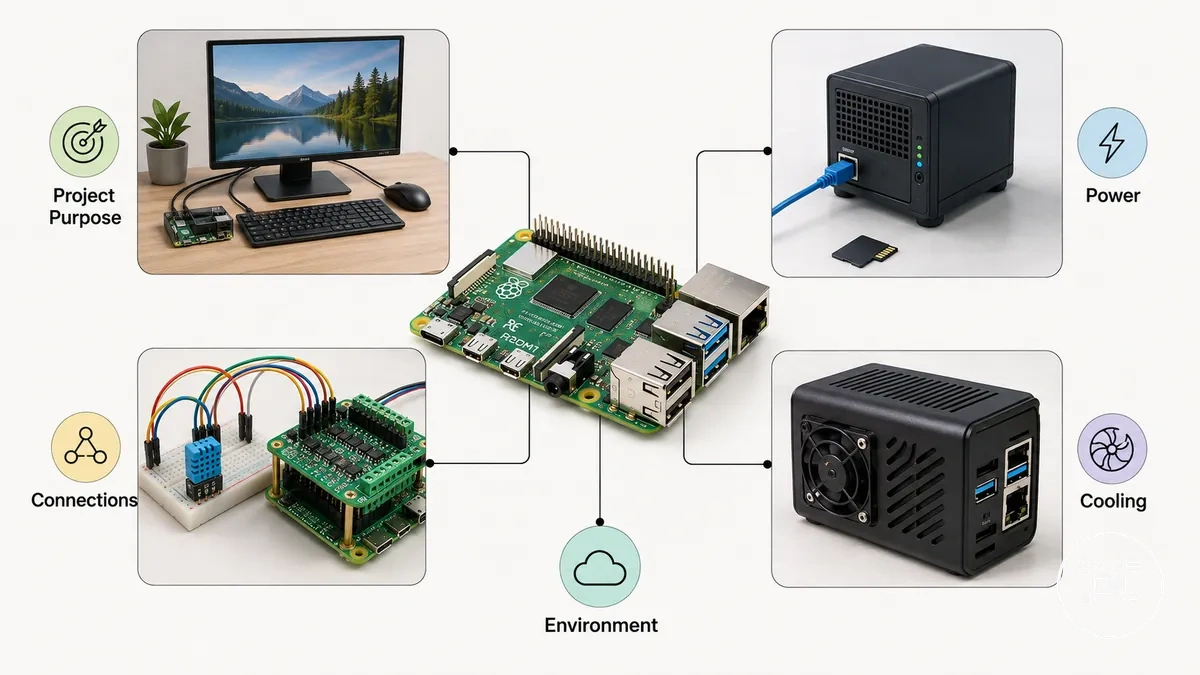
Project requirements provide the most reliable selection criteria because they identify which accessories are essential and which are optional. Before purchasing accessories, use an essential accessories checklist to confirm the Raspberry Pi model, required peripherals, storage method, display connection, GPIO expansion, network connectivity, enclosure size, cooling needs, and power supply specification.
- Project purpose: Desktop systems normally require a display, keyboard, mouse, and storage, while headless servers generally require only power, storage, and network connectivity after remote access has been configured.
- Expansion requirements: GPIO projects require compatible HATs, sensors, cameras, or interface boards. Raspberry Pi 4 Model B and Raspberry Pi 5 both provide a 40-pin GPIO header according to Raspberry Pi Documentation.
- Connection interfaces: Raspberry Pi 4 Model B and Raspberry Pi 5 use dual micro-HDMI ports, whereas Raspberry Pi Zero and Raspberry Pi Zero 2 W use a single mini-HDMI connector. Selecting the correct display cable prevents unnecessary adapters.
- Operating conditions: Projects running continuously, operating inside enclosed cases, or using multiple USB peripherals should prioritise suitable cooling, airflow, and adequate power delivery rather than appearance or accessory quantity.
Power requirements are a practical compatibility criterion. According to Raspberry Pi Documentation, Raspberry Pi 4 Model B requires a 5 V 3 A USB-C power supply (15 W), while Raspberry Pi 5 is designed for a 5 V 5 A USB-C PD power supply (25 W) to support higher USB peripheral current. Selecting the correct power supply helps maintain stable operation under sustained workloads.
Power requirements are a practical compatibility criterion.
For example, a Raspberry Pi 5 desktop project using an external SSD, keyboard, mouse, and official Active Cooler benefits from the recommended 25 W USB-C PD supply specified by Raspberry Pi Documentation. In contrast, a Raspberry Pi Zero 2 W environmental sensor powered through GPIO with Wi-Fi connectivity typically requires only a microSD card, protective enclosure, and compatible power source, demonstrating how project requirements determine accessory selection rather than the number of available accessories.
Raspberry Pi Project Accessory Types and Their Roles
Raspberry Pi accessory types are classified by the function they provide within a project rather than by a universal hardware kit. According to Raspberry Pi Documentation, the main categories include power accessories, storage devices, display and input peripherals, expansion hardware, protection and cooling accessories, and camera or networking accessories, with each category supporting a specific project requirement.
The illustration below organises Raspberry Pi accessory categories by their primary project role instead of product type.
The illustration below organises Raspberry Pi accessory categories by their primary project role instead of product type. Viewing accessories by purpose makes it easier to identify which hardware provides power, interaction, expansion, protection, storage, or connectivity for a particular Raspberry Pi project.
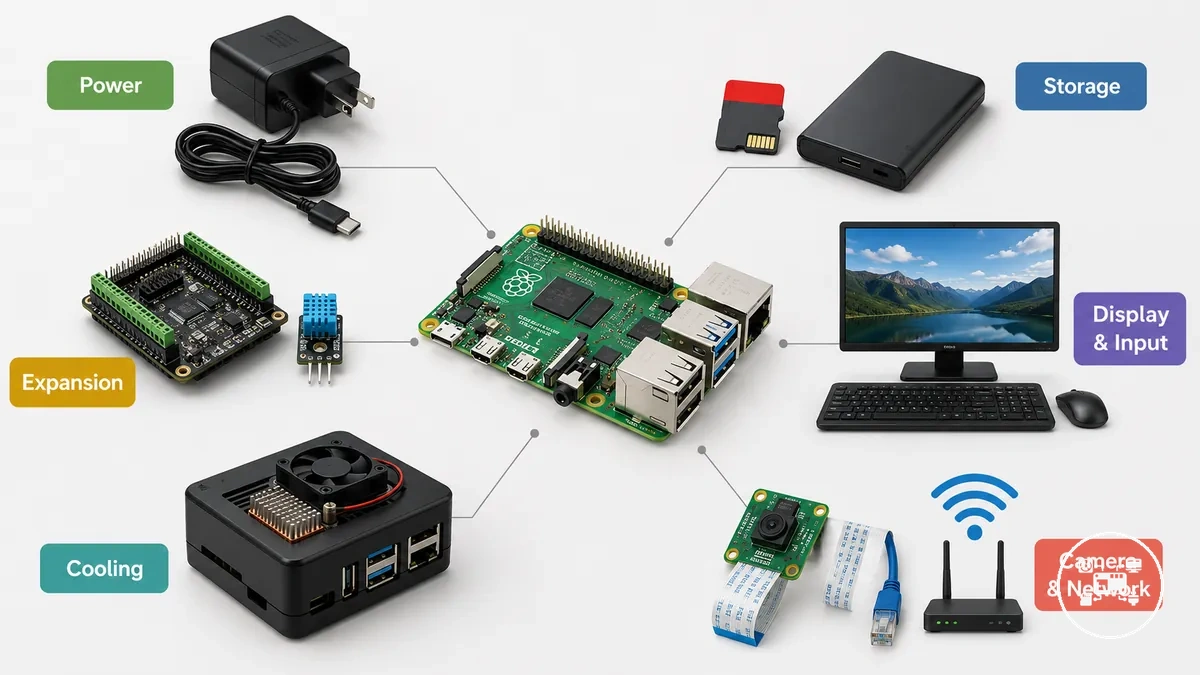
- Power accessories: USB power supplies, Power over Ethernet (PoE) hardware, batteries, and power management boards provide the electrical power required to operate Raspberry Pi systems. According to Raspberry Pi Documentation, Raspberry Pi 4 Model B is designed for a 5 V 3 A USB-C supply, while Raspberry Pi 5 supports a recommended 5 V 5 A USB-C PD supply for maximum peripheral capability.
- Storage accessories: microSD cards, USB flash drives, and external SSDs store the operating system and project data. Raspberry Pi Documentation states that Raspberry Pi boots from microSD by default, while supported USB boot enables faster storage devices for workloads such as servers and media centres.
- Display and input accessories: HDMI displays, touchscreens, keyboards, mice, and display cables enable user interaction. These accessories are most suitable for desktop computing, education, digital signage, and kiosk projects that require direct visual control.
- Expansion accessories: HATs, GPIO breakout boards, sensors, relay modules, and interface boards extend hardware functionality. According to Raspberry Pi Documentation, Raspberry Pi 4 Model B and Raspberry Pi 5 both provide a 40-pin GPIO header that supports compatible expansion hardware for automation, robotics, and physical computing.
- Protection and cooling accessories: Cases, heatsinks, and active cooling devices protect the board and help control operating temperature during sustained processing or installation inside enclosed spaces. Their role is to improve environmental suitability rather than expand computing capability.
- Camera and networking accessories: Camera modules, Ethernet adapters, Wi-Fi accessories, antennas where applicable, and communication interfaces allow Raspberry Pi projects to capture images or exchange data across local or remote networks.
For example, according to Raspberry Pi Documentation, a Raspberry Pi 5 desktop computer commonly combines a 25 W USB-C PD power supply, microSD or SSD storage, display peripherals, and a protective case, whereas a Raspberry Pi Zero 2 W environmental monitoring project typically uses power, microSD storage, GPIO sensors, and wireless networking instead of display hardware. This comparison demonstrates that accessory categories are selected according to project roles rather than assembled as a standard package.
Accessories for GPIO, Sensor, and Maker Projects
GPIO, sensor, and maker accessories enable Raspberry Pi systems to interact with external hardware for physical computing, automation, and prototyping. According to Raspberry Pi Documentation, Raspberry Pi 4 Model B and Raspberry Pi 5 provide a 40-pin GPIO header that supports digital input/output, I²C, SPI, UART, PWM, and power pins, allowing compatible accessories to exchange data and control external devices when they match the board's electrical interface and operating voltage.
GPIO, sensor, and maker accessories enable Raspberry Pi systems to interact with external hardware for physical computing, automation, and prototyping.
GPIO accessories should be selected according to the project's communication protocol, voltage compatibility, and required function rather than by accessory type alone. According to Raspberry Pi Documentation, HATs follow a standard mechanical and electrical layout for the 40-pin GPIO header, while breakout boards, sensors, relay modules, and interface boards must also match the Raspberry Pi's 3.3 V GPIO logic levels to operate safely.
- GPIO breakout boards: Route the 40-pin GPIO header to labelled terminals or breadboards, making circuit assembly and troubleshooting easier during prototyping.
- Sensor modules: Add environmental, motion, distance, light, pressure, or humidity measurement using interfaces such as I²C, SPI, UART, or digital GPIO, depending on the sensor design.
- HATs and expansion boards: Extend Raspberry Pi functionality with motor controllers, analogue-to-digital converters, communication modules, displays, or industrial interfaces while maintaining compatibility with the Raspberry Pi HAT specification where applicable.
- Maker accessories: Breadboards, jumper wires, resistors, LEDs, switches, and logic-level compatible components support rapid circuit development, testing, and educational electronics projects.
For example, a Raspberry Pi 5 environmental monitoring project can connect a digital temperature and humidity sensor through the I²C interface using only four signal connections: 3.3 V power, ground, SDA, and SCL. According to Raspberry Pi Documentation, this arrangement allows multiple compatible I²C devices to share the same bus while using separate device addresses, reducing wiring complexity for maker and sensor projects.
Projects requiring additional expansion can also use GPIO accessories for projects that match the board's header layout and supported communication protocols.
Choosing accessories according to GPIO interface, voltage compatibility, and project function helps ensure reliable communication between the Raspberry Pi and connected hardware. Projects requiring additional expansion can also use GPIO accessories for projects that match the board's header layout and supported communication protocols.
This chart shows the key selection criteria, common accessory types, and an example I²C sensor project for choosing GPIO accessories on Raspberry Pi.
This chart shows the key selection criteria, common accessory types, and an example I²C sensor project for choosing GPIO accessories on Raspberry Pi.

Accessories for Display, Storage, and Connected Projects
Display, storage, and connection accessories should match the Raspberry Pi model, the required visual output, the boot and data workload, and the network method. Display accessories provide local visual output, storage accessories hold the operating system and project files, and connection accessories provide wired, wireless, or peripheral communication.
Display, storage, and connection accessories should match the Raspberry Pi model, the required visual output, the boot and data workload, and the network method.
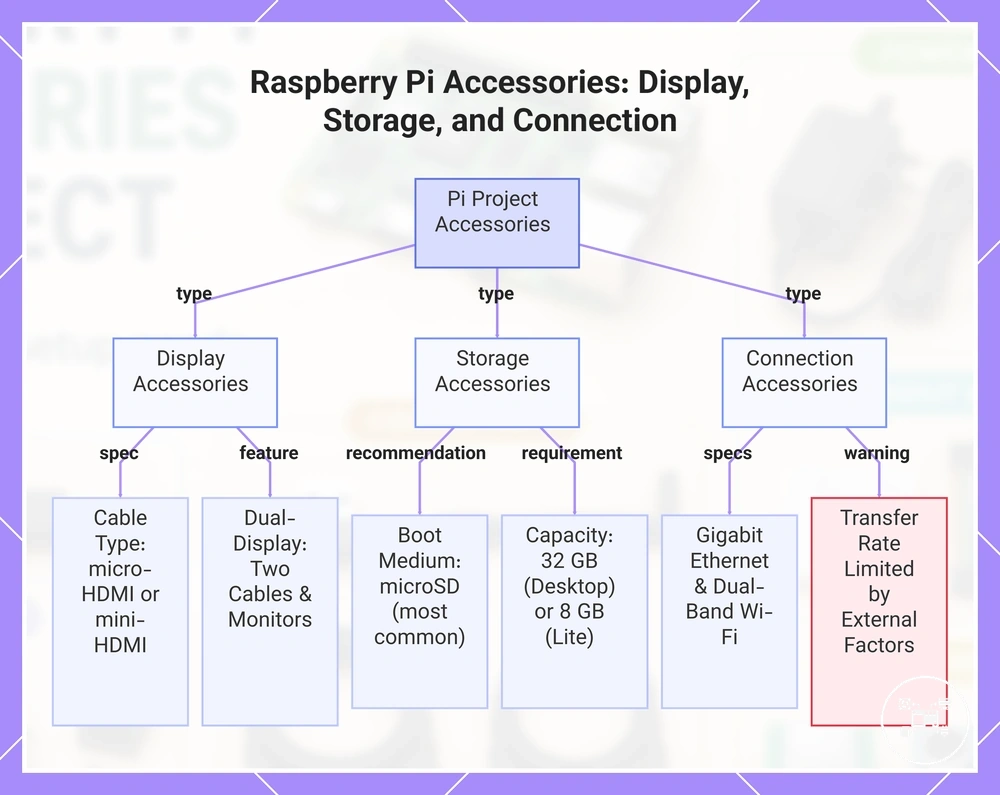
For display-based projects, Raspberry Pi Documentation specifies a micro-HDMI-to-HDMI cable for Raspberry Pi 4 Model B and Raspberry Pi 5, while Raspberry Pi Zero and Zero 2 W require a mini-HDMI-to-HDMI cable. Raspberry Pi Documentation also states that Raspberry Pi 4 and later support two HDMI outputs, so a dual-display project requires two compatible display cables and two independently powered monitors.
Storage selection should reflect both boot compatibility and capacity.
Storage selection should reflect both boot compatibility and capacity. Raspberry Pi Documentation identifies microSD as the most common boot medium, recommends at least 32 GB for Raspberry Pi OS Desktop or 8 GB for Raspberry Pi OS Lite, and notes that newer models can also boot from USB mass storage, network storage, or NVMe storage through PCIe when the model and configuration support that method.
Connected projects should use the interface required by the workload: Ethernet for a fixed wired connection, onboard Wi-Fi for wireless networking, or Bluetooth and USB for local peripherals.
Connected projects should use the interface required by the workload: Ethernet for a fixed wired connection, onboard Wi-Fi for wireless networking, or Bluetooth and USB for local peripherals. Raspberry Pi Documentation lists Gigabit Ethernet and dual-band 2.4 GHz and 5 GHz IEEE 802.11ac Wi-Fi for Raspberry Pi 4 Model B and Raspberry Pi 5, although achievable transfer rates remain limited by the network equipment, signal conditions, storage device, and protocol overhead.
These media center accessory needs differ from a headless file server, which can omit the display cable and monitor while retaining storage and network accessories.
For example, a Raspberry Pi 5 media system can use one micro-HDMI cable for a television, a 32 GB or larger microSD card for Raspberry Pi OS, a separate USB or NVMe storage device for media files, and Gigabit Ethernet for a fixed network connection. These media center accessory needs differ from a headless file server, which can omit the display cable and monitor while retaining storage and network accessories.
This chart shows the three main categories of accessories for Raspberry Pi projects and their key specifications and requirements.
This chart shows the three main categories of accessories for Raspberry Pi projects and their key specifications and requirements.
Matching Accessory Features With Project Compatibility Needs
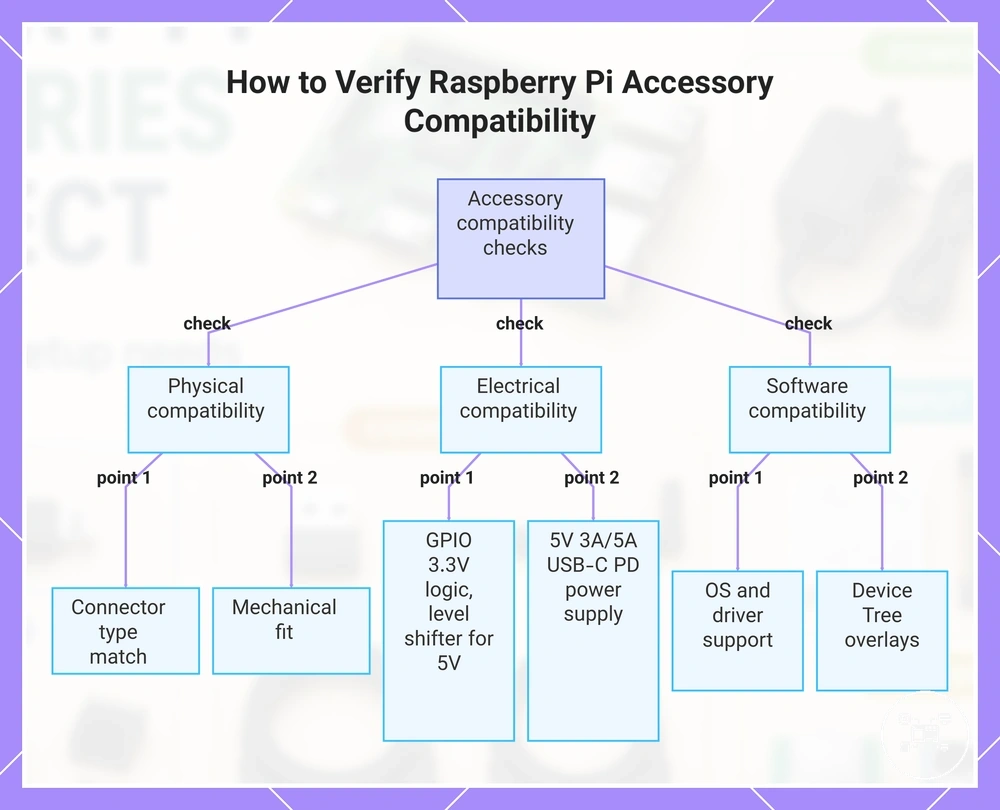
Accessory features are compatible with a Raspberry Pi project only when the accessory matches the Raspberry Pi model, interface, electrical requirements, physical dimensions, and supported software. According to Raspberry Pi Documentation, compatibility should be verified by confirming connector type, GPIO interface, power specification, mounting format, and operating system support before selecting an accessory for a project.
Compatibility should be evaluated using measurable hardware characteristics instead of product category alone.
Compatibility should be evaluated using measurable hardware characteristics instead of product category alone. According to Raspberry Pi Documentation, Raspberry Pi 4 Model B and Raspberry Pi 5 provide two micro-HDMI display outputs and a 40-pin GPIO header, while Raspberry Pi Zero and Raspberry Pi Zero 2 W use a single mini-HDMI connector and the same 40-pin GPIO layout. Raspberry Pi Documentation also specifies a recommended 5 V 3 A (15 W) USB-C power supply for Raspberry Pi 4 Model B and a recommended 5 V 5 A (25 W) USB-C PD power supply for Raspberry Pi 5 to enable full USB peripheral current capability. :contentReference[oaicite:0]{index=0}
- Connector compatibility: Match the accessory interface to the Raspberry Pi connector, including micro-HDMI, mini-HDMI, USB, CSI camera, DSI display, GPIO, or Ethernet.
- Electrical compatibility: Verify operating voltage and GPIO logic levels. According to Raspberry Pi Documentation, Raspberry Pi GPIO uses 3.3 V logic, so accessories designed only for 5 V signalling require an appropriate level shifter.
- Mechanical compatibility: Confirm that cases, HATs, cooling systems, cameras, or storage devices physically fit the selected Raspberry Pi model without obstructing required ports or connectors.
- Software compatibility: Verify that Raspberry Pi OS or the intended operating system supports the accessory through the required drivers, firmware, or Device Tree overlays.
For example, according to Raspberry Pi Documentation, Raspberry Pi 5 replaces the previous 15-pin camera connector with two 22-pin CAM/DISP connectors. Connecting an earlier Raspberry Pi Camera Module therefore requires an official 22-pin-to-15-pin adapter cable, demonstrating that connector dimensions must match even when both devices belong to the Raspberry Pi ecosystem. :contentReference[oaicite:1]{index=1}
For example, according to Raspberry Pi Documentation, Raspberry Pi 5 replaces the previous 15-pin camera connector with two 22-pin CAM/DISP connectors.
Applying these compatibility checks helps ensure that Raspberry Pi accessories meet the project's hardware and software requirements while avoiding unsupported assumptions that an accessory is compatible with every Raspberry Pi model.
This chart shows the three main compatibility categories—physical, electrical, and software—for selecting a Raspberry Pi accessory.
This chart shows the three main compatibility categories—physical, electrical, and software—for selecting a Raspberry Pi accessory.
Selecting Between Individual Accessories and Project Kits
Choose individual accessories when the Raspberry Pi project has model-specific requirements or reusable components; choose a project kit when the required parts are not already available and the kit explicitly matches the board model, power specification, connectors, and intended task. The decision should compare required-component coverage, duplicate parts, replacement flexibility, and verified compatibility rather than assume that either option is universally preferable. :contentReference[oaicite:0]{index=0}
| Decision criterion | Individual accessories | Project kit |
|---|---|---|
| Component coverage | Each required part is selected separately; unnecessary items can be omitted. | Useful when the included parts collectively cover the defined project requirements. |
| Existing equipment | Suitable when compatible displays, cables, storage, cases, or power supplies are already available. | Can create duplicate components when equivalent accessories are already owned. |
| Compatibility checking | Every component must be checked against the board model and required interface. | The complete contents still require verification because the kit label alone does not establish model-specific compatibility. |
| Replacement flexibility | A single component can be replaced without changing the remaining setup. | An unsuitable included component may need to be replaced separately, reducing the bundle's practical value. |
| Project scope | Fits upgrades, specialised builds, and projects with a defined parts list. | Fits first assemblies and repeatable classroom or workshop setups when every required component is included. |
Power specifications illustrate why both options require model checks. Raspberry Pi Documentation specifies 5 V at 3 A, equal to 15 W, for Raspberry Pi 4 Model B and 5 V at 5 A, equal to 25 W, for full Raspberry Pi 5 peripheral capability; Raspberry Pi 5 can use a 5 V at 3 A supply with the USB peripheral current restricted to 600 mA. A kit containing a 15 W supply can therefore match a Raspberry Pi 4 project but does not provide the full 25 W power configuration specified for Raspberry Pi 5. :contentReference[oaicite:1]{index=1}
Power specifications illustrate why both options require model checks.
For example, suppose a project requires six components and the user already owns a compatible monitor, keyboard, mouse, and storage device. Selecting the two missing accessories individually avoids four duplicates, whereas a six-component kit is useful only when its complete contents are required and each interface matches the selected Raspberry Pi model.
For example, suppose a project requires six components and the user already owns a compatible monitor, keyboard, mouse, and storage device.
Use the kit or individual parts comparison when the remaining decision concerns bundle coverage, duplicated hardware, and component-level flexibility after compatibility requirements have been defined.